8 Troubleshooting
56 K-439 Operation Manual, Version B
8 Troubleshooting
This chapter helps to resume operation after a problem has occurred with the instrument which does
not require special technical training. It lists possible occurrences, their probable cause and suggests
how to remedy the problem.
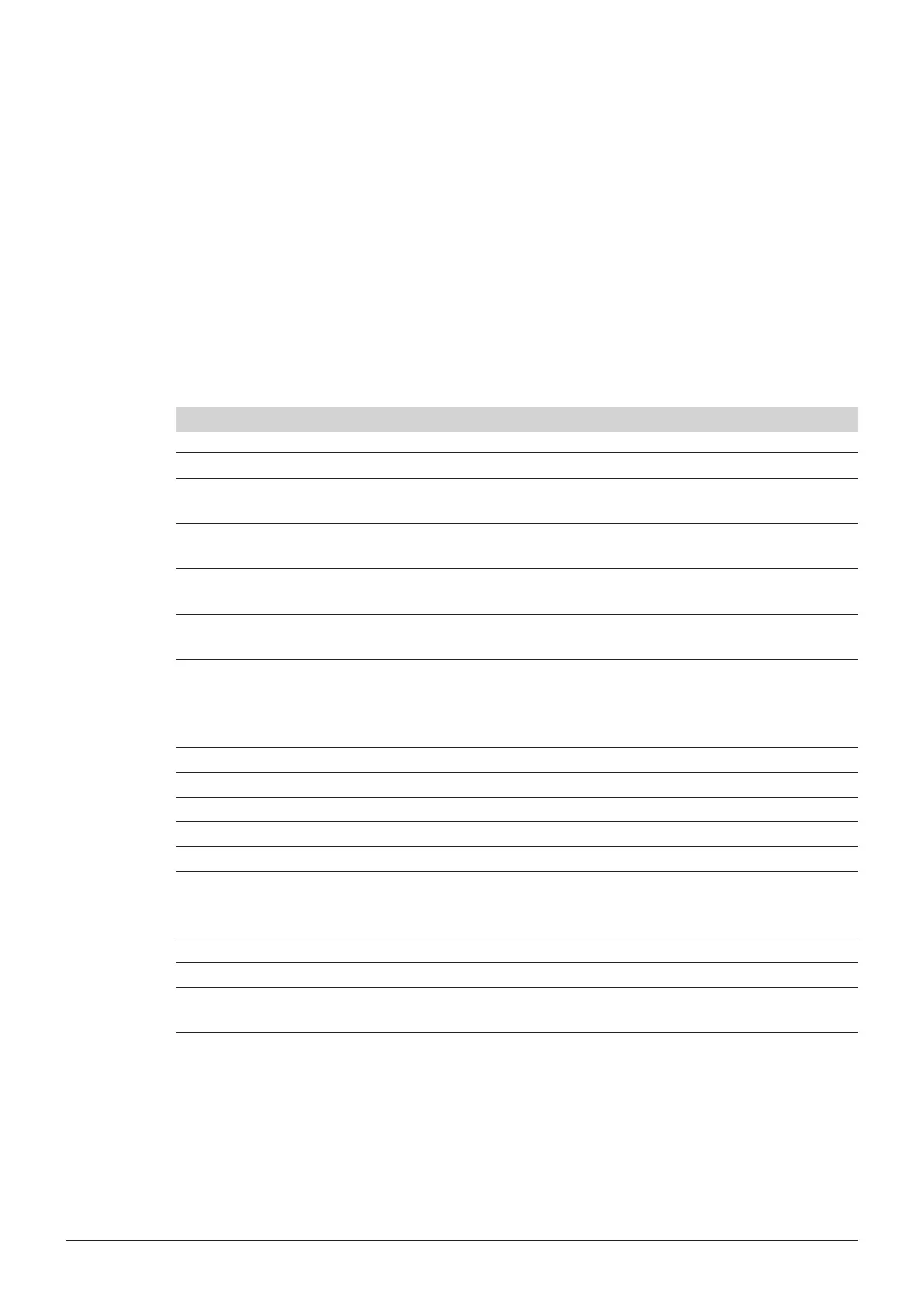
The troubleshooting table below lists possible malfunctions and errors of the instrument. The operator
is enabled to correct some of those problems or errors by him/herself. For this, appropriate corrective
measures are listed in the column “Remedy”.
8.1 Malfunctions and their remedy
Info/error numbers and messages and their corrective measures
Info/error number Message Measure
1 You cannot delete the actual method! Do not try to delete the current method.
4 You have changed an existing method. Over-
write method?
Overwrite the existing method or store the
new parameters under a new name.
5 The method list is full! You have to delete
some methods.
Delete some methods and add new
methods.
6 Heating nished! Heating process is nished, take racks in
cooling position. Press OK to conrm it.
7 Digestion done! Digestion and cooling is nished. Press OK
to conrm it.
8 The actual temperature is higher than the
preheating temperature. Start Step 1?
Choose "Yes" to start with a higher
temperature. Choose "No" to wait until the
system is cooled down to the preheating
temperature.
9 EEPROM for Device Data defect or missing! Contact the Buchi customer service.
10 EEPROM for Print Data defect! Contact the Buchi customer service.
11 Temperature sensor 1. Contact the Buchi customer service.
12 Temperature sensor 2. Contact the Buchi customer service.
15 Electronic device too hot Contact the Buchi customer service.
16 Supply voltage out of range Make sure that the mains voltage corre-
sponds to the type plate. If yes, contact
the Buchi customer service.
17 Unit runs in Demo Mode. Switch off the Demo Mode in the Settings.
18 Restart from Watchdog. No corrective measure needed.
19 Delete "XY"? Conrmation for deletion of a method
needed.












 To Next Page