10
4D LABS, Simon Fraser University 8888 University Drive, Burnaby, B.C. V5A 1S6
E nanoimaging@4dlabs.ca T 778.782.8158 F 778.782.3765 W www.4dlabs.ca
Loading a Specimen Holder
To load either the Single Force of Central Force Specimen Holder:
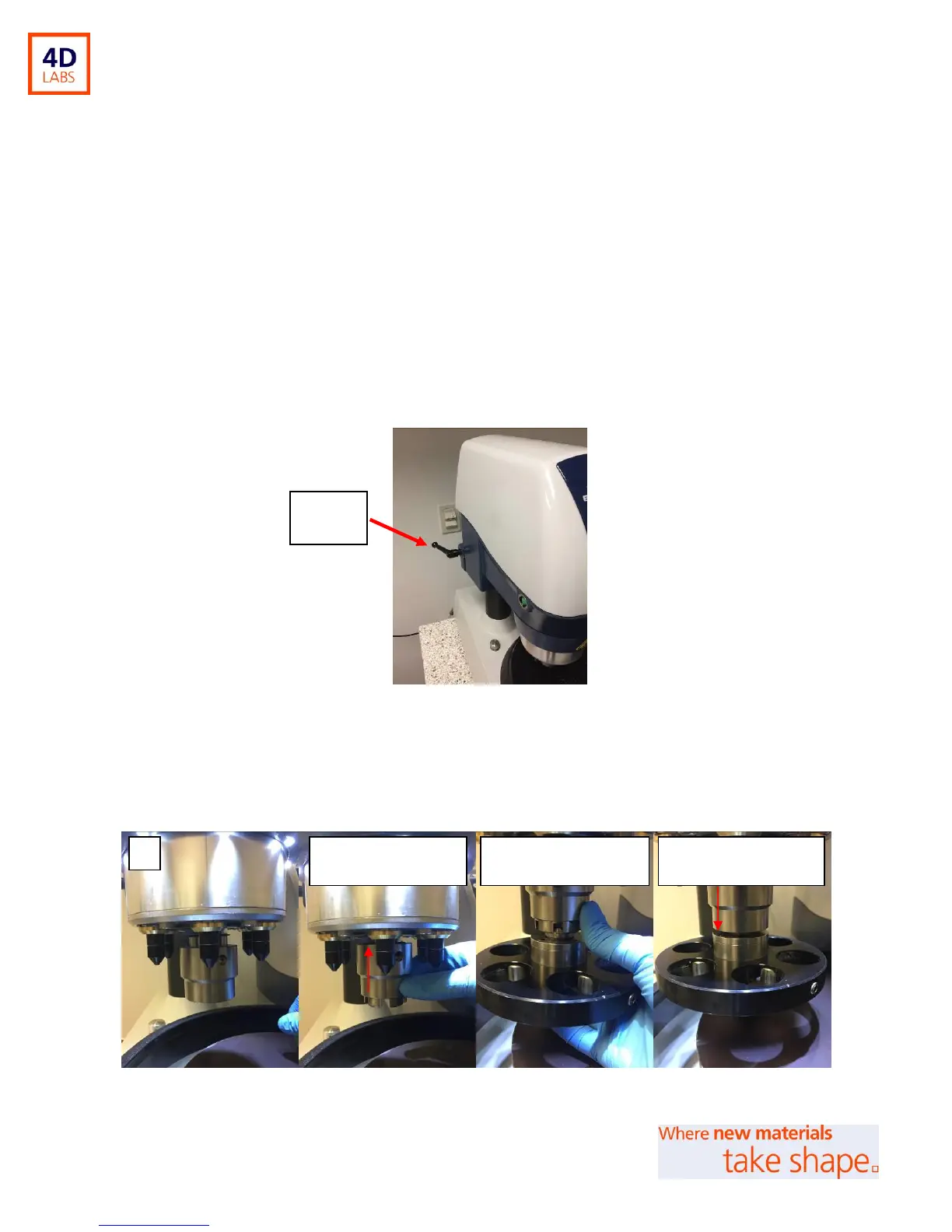
1. Position the Power Head for easy loading of the specimen holder. Untighten the locking handle
(see Figure 3) on the left side of the Power Head to enable rotation of the head. Tighten the
locking handle once the Power Head is in place.
2. Move the Power Head into the desired position. (Buehler recommends the specimen be
approximately 1/3 off the edge of the platen in its outmost position.)
3. Rotate the locking handle clockwise to tighten and secure the Power Head into position.
Figure 3: Locking Handle
4. To attach the Specimen Holder, raise the outer sleeve of the lift-lock chuck of the Power Head
(Figure 4B).
Figure 4: Lift-Lock Chuck on Power Head
B: Lift and hold sleeve
of lock chuck
C: Align pins of specimen
holder to lock chuck
D: Release lock chuck to
secure sample holder


 To Next Page