9
4D LABS, Simon Fraser University 8888 University Drive, Burnaby, B.C. V5A 1S6
E nanoimaging@4dlabs.ca T 778.782.8158 F 778.782.3765 W www.4dlabs.ca
4. Proceed to begin the polishing procedure. Do not use a water flow during polishing as this will
remove the diamond fluid from the cloth.
5. At the end of the polishing cycle, use water to rinse both the cloths and your sample.
6. Store the polishing cloth (whilst still damp) into a zip-lock bag and store in the correct grey storage
drawer.
Preparing Samples in the Power Head:
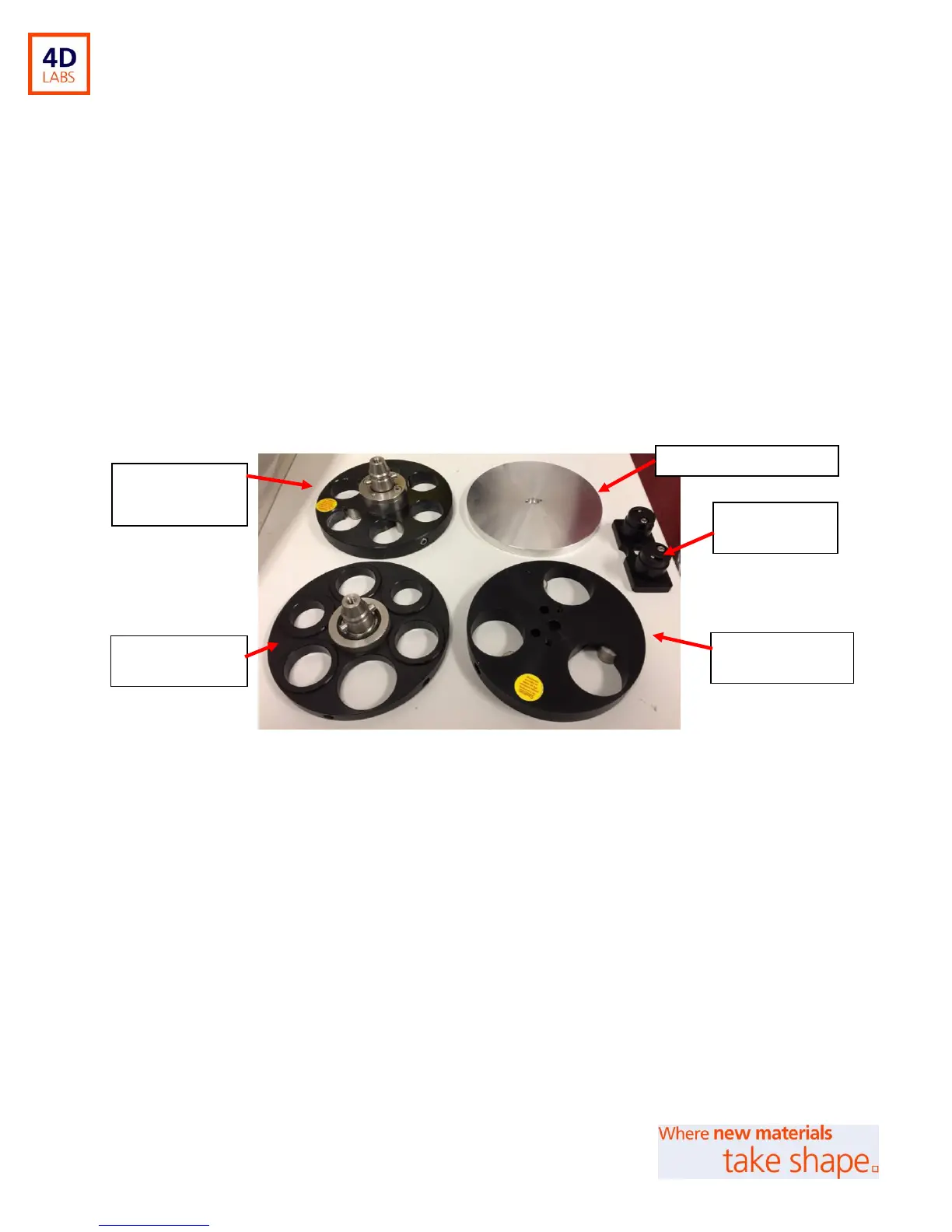
Specimen Holders
Figure 2: Different sample holders
A. Central Force Holder (1): Supports 1.25” samples
B. Single Force Holder: 40 mm samples with distance rings insets for 1” & 1.25” samples.
C. Flat-Sample Holder: For support of flat/unconventional samples e.g. Si wafers
D. Glass-Slide Holder: Supports 27 x 46 mm glass slides. This holder attaches into the single force
holder using 2 x 1” distance rings; see Section titled “Mounting the Glass Slide Holder”.
E. Central Force Holder (2): Supports 3 x 40 mm samples.
A: Central Force
Holder (1)
E: Central Force
Holder (2)


 To Next Page