Filter Replacement (ltered models only)
Code: GC719
WhenthelterneedsreplacingtheRedLEDonthecontrollerwillash.Toreplacethe
lter:
1. Remove drip tray
2. Twistthecartridge90
0
(1/4 turn) counter clockwise to unlock (care should be
taken when doing this as it will contain a small amount of water)
3. Insertnewltercartridgeintolterhead
4. Turn cartridge clockwise to lock
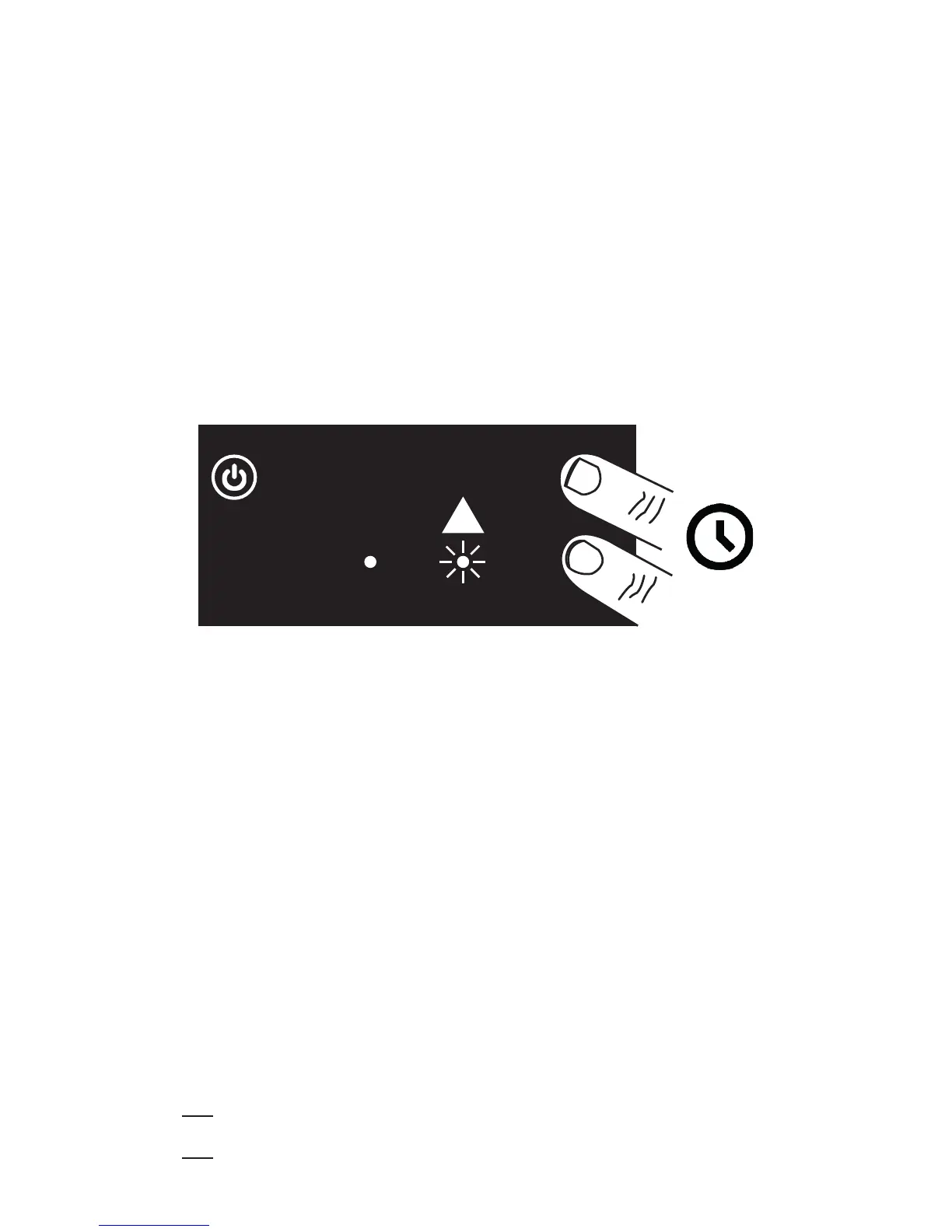
Toresetthelterwarning(ashingLED)thefollowingproceduremusttakeplace:
1. Placengersonthecontrollerscreenasindicatedintheimagebelow:
Cleaning & Maintenance
WARNING: Disconnect unit from electrical supply
before cleaning, descaling or replacing any parts.
Cleaning
We recommend cleaning your appliance on a regular basis. Failure to do this
may result in the appliance not operating to its full potential and could invali-
date your warranty.
Important: Do not immerse the appliance in water or any other liquids and take care
to keep water away from the mains lead and connections.
1. Clean the external surfaces of the unit regularly to maintain hygiene.
2. Empty the drip tray regularly
3. Wipe the dispensing tap daily to remove any lime-scale deposits and check that
the water outlet is clear
4. Wipe the unit down with a damp soft cloth
5. Do not allow excess water to run into the unit
6. Do not use abrasive creams or scoure


 To Next Page