MiniStation™
• Shock Resistance body to protect your data from
the knocks and shocks of daily life
• Flat, wrap around cable management system,
integrated into the body - so you will never lose
the cable again
• Full Disk Encryption for Windows
®
to protect data
from unauthorised access
• TurboPC/Turbo Copy - increase le transfer and
copy performance by up to 2 x faster!
• SecureLockManager Easy™ for Windows
remembers your logon credentials and logs you
on to your drive quickly when using Full Disk
Encryption for Windows
• Includes Picasa software from Google™ that
allows you to easily organise and edit digital
photos and movies
• Stylish glossy design, in three great colours,
Black, White and Red
• Easy to use and set-up out of the box, no drivers
or power supply required
• Connects via USB to any PC or Mac
Key Specications
| Portable USB Hard Drive with Hardware Encryption
| Stylish design with glossy nish, and Shock Resistant body
available in three colours, Black, White and Red
| FlexConnect Cable Management - Flat wraparound USB cable
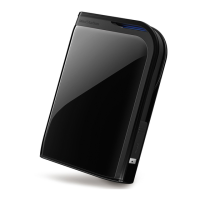
Buffalo’s MiniStation™ USB Hard Drive offers a compact,
lightweight and portable storage solution for all. The
MiniStation™ securely protects your data from prying eyes
through hardware encryption and has excellent shock
protection against those accidental knocks.
The MiniStation™ comes complete with the Buffalo Tools
suite of complimentary software that offers enhancements
such as TurboPC and Turbo Copy which help to increase
le transfer and copy performance by up to 2x faster
compared to standard USB2.0 portable hard drives, whilst
Buffalo Backup software offers easy data backup and
restore solutions.
Securely store, back-up and transport digital images, music
and other les without taking valuable space on your PC’s
hard drive.
FlexConnect
USB Cable
Portable Storage
MiniStation™
HD-PXTU2-EU
www.buffalo-technology.com
Data Transfer up to
x
2
Faster
x
2
Faster
Enable
Time to transfer 1,000 digital photos.
Disable
34
sec.
34
sec.
71sec.

 Need help?








 To Next Page
 General