Chapter1 Setup
LinkStation User Manual 6
1
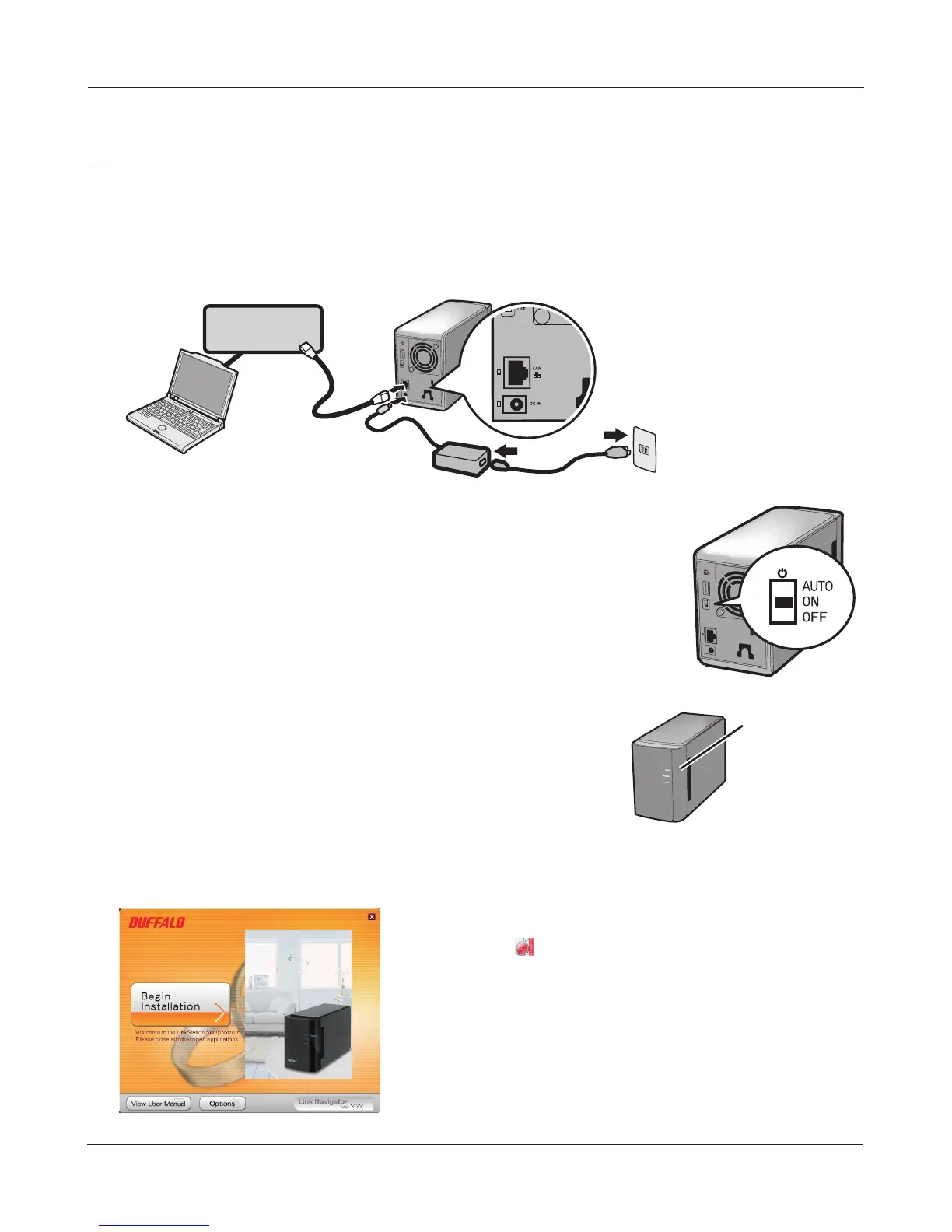
Connect the LinkStation with the AC adaptor and an Ethernet cable. Plug the power cord into a
surge protector or power outlet. Connect the Ethernet cable to a router, hub, or switch on your
network. The Ethernet cable will “click” and lock in place when inserted properly.
2
Move the Power Mode Switch on the back of the LinkStation to the ON
position.
Note: Do not set the Power Mode Switch to AUTO at this time. After the
initial installation is complete, then the Auto Power Mode may
be used.
3
Wait until the power LED stops blinking and glows a steady blue.
4
Insert the Utility CD in your computer’s CD drive. LinkNavigator will launch.
Click [Begin Installation].
LinkNavigator Setup (LS-WXL)
If LinkNavigator does not open, open the Utility CD and
double-click [LSNavi.exe].
Power LED













 To Next Page