OFF
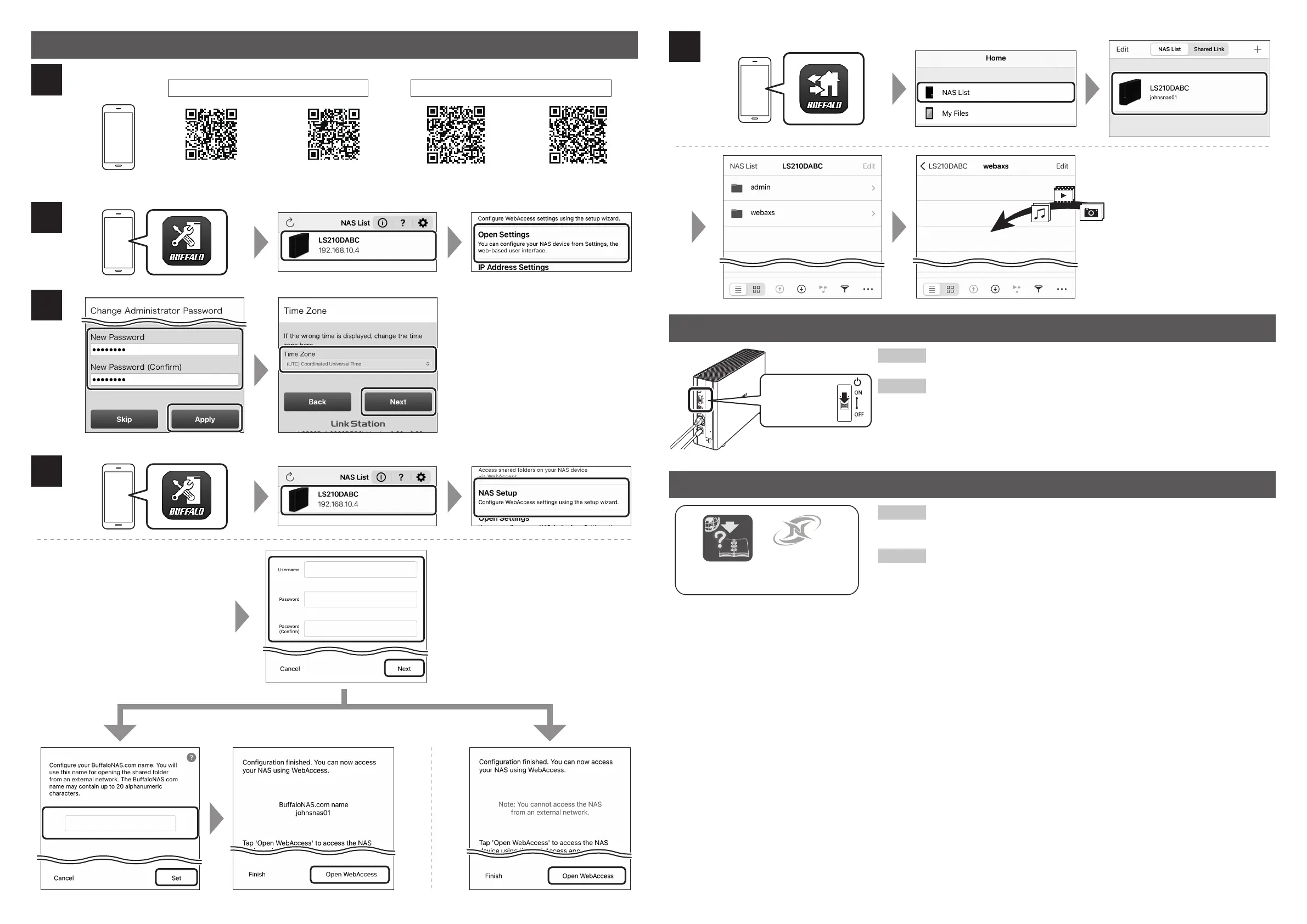
To turn off the LinkStation, move the power switch to the “Off” position.
Once the power LED goes out, you may unplug the AC adapter.
Pour éteindre la LinkStation, placez l’interrupteur en position «Off». Vous
pouvez débrancher l’adaptateur CC une fois le voyant d’alimentation
éteint.
https://d.buffalo.jp/LS210D/
NovaBACKUP
SmartPhone Navigator WebAccess ASmartPhone Navigator WebAccess i
This LinkStation model includes the license for NovaBACKUP, a backup and
recovery software suite. Visit the link on the left to download the product
manuals and the NovaBACKUP installer.
Ce modèle de LinkStation inclut une licence pour NovaBACKUP, une suite
logicielle de sauvegarde et de restauration. Suivez le lien à gauche pour
télécharger les manuels d’utilisation du produit et l’exécutable
d’installation de NovaBACKUP.
Initial Setup Using Mobile Devices
iOS Android
1
2
3
4
5
Turning Off the LinkStation
Manuals and Drivers
EN
FR
EN
FR











 To Previous Page