6 Infotainment System
Radio with Navigation
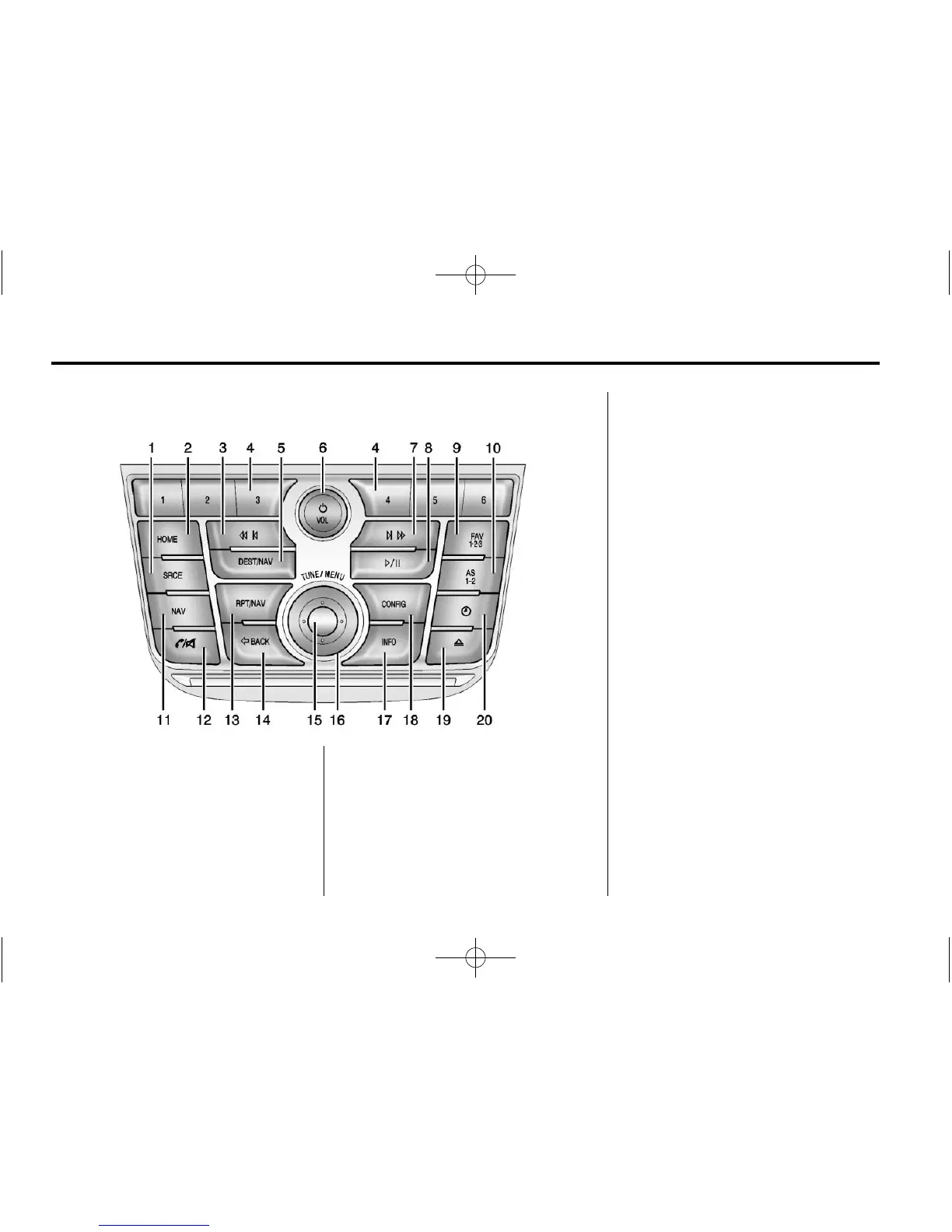
1. SRCE (Source)
2. HOME
3.
s © (Previous/Fast Reverse)
4. Buttons 1−6
5. DEST/NAV (Destination
Navigation)
6.
O /VOL (Power/Volume)
7.
¨ \ (Next/Fast Forward)
8.
J (Play/Pause)
9. FAV 1-2-3 (Favorites)
10. AS 1-2 (Autostore)
11. NAV (Navigation)
12.
V /8 (Phone/Mute)
13. RPT/NAV (Repeat Navigation)
14.
/ BACK
15. Inner Rocker Knob
16. TUNE/MENU Knob
17. INFO (Information)
18. CONFIG (Configuration)
19.
Z (Eject)
20.
H (Clock)
Infotainment Control Buttons
SRCE (Source): Press to change
the audio source to AM, FM, XM
(if equipped), Pandora, Stitcher, CD,
USB, AUX, or Bluetooth Audio.
HOME: Press to go to the Home
Page. See “Home Page” in this
section.


 To Next Page
 Loading...