Buick Envision Owner Manual (GMNA-Localizing-U.S./Canada/Mexico-
10122659) - 2017 - crc - 6/10/16
Storage 101
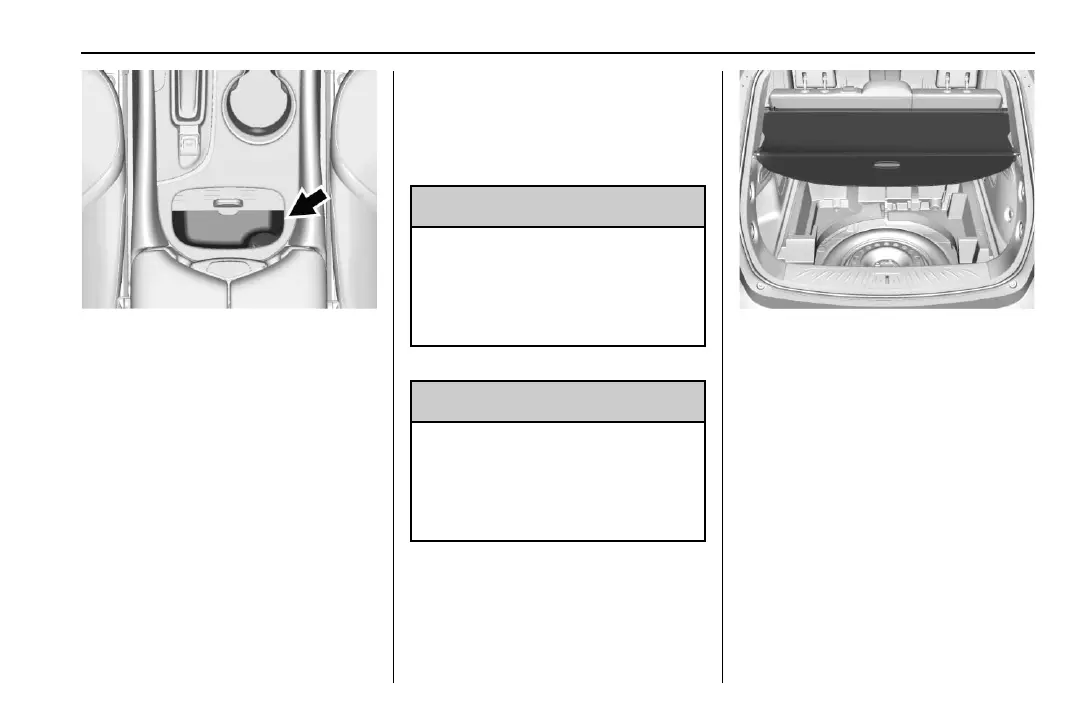
There is a small covered bin directly
in front of the center console. Use
the handle to open the covered bin.
There is a power outlet inside.
Additional Storage
Features
Cargo Cover
{
Warning
An unsecured cargo cover could
strike people in a sudden stop or
turn, or in a crash. Store the
cargo cover securely or remove it
from the vehicle.
{
Warning
Do not place objects on the cargo
cover. Sudden stops or turns can
cause objects to be thrown in the
vehicle. You or others could be
injured.
If equipped, use the cargo cover to
cover items in the rear of the
vehicle.
To remove the cover from the
vehicle, pull both ends toward each
other. To reinstall, place each end of
the cover in the holes behind the
rear seat.













 To Next Page