Buick Regal Owner Manual (GMNA-Localizing-U.S./Canada-10999315) -
2018 - CRC - 9/11/17
22 In Brief
Portable Audio Devices
This vehicle has a 3.5 mm (1/8 in)
auxiliary input and USB ports on
the center console. See USB Port
0 178. External devices such as
iPods, laptop computers, MP3
players, CD players, and USB
drives may be connected,
depending on the audio system.
See Auxiliary Devices 0 184.
Bluetooth
The Bluetooth system allows users
with a Bluetooth-enabled cell phone
to make and receive hands-free
calls using the vehicle audio system
and controls.
The Bluetooth-enabled cell phone
must be paired with the in-vehicle
Bluetooth system before it can be
used in the vehicle. Not all phones
will support all functions.
See Bluetooth (Overview) 0 184 or
Bluetooth (Infotainment Controls)
0 185.
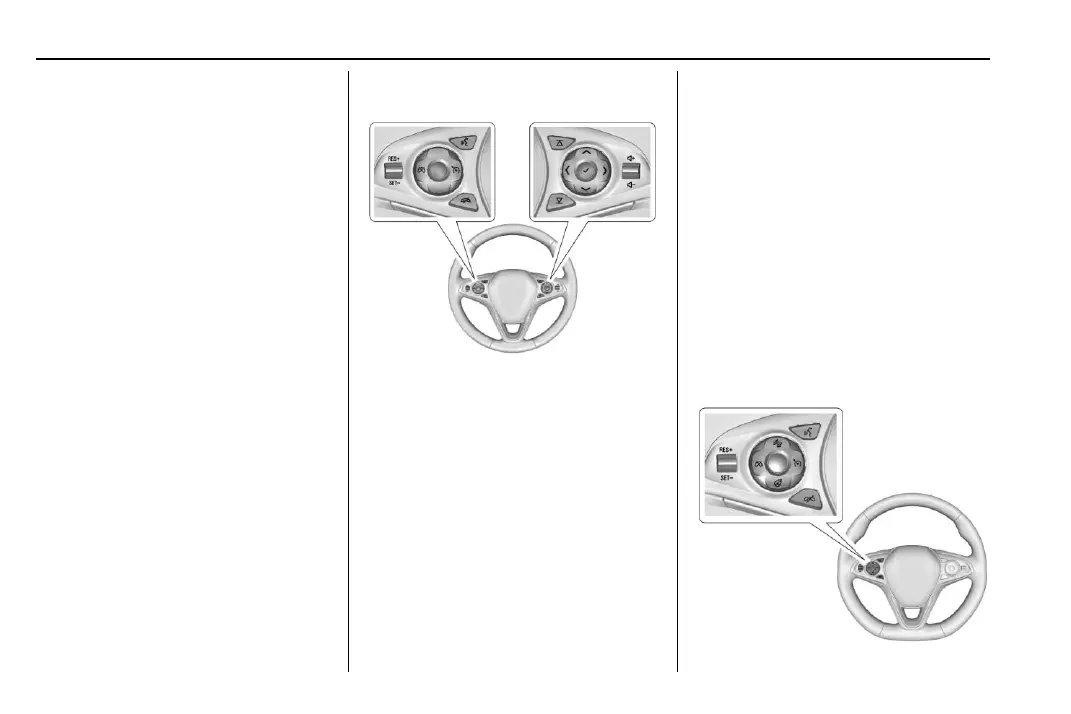
Steering Wheel Controls
For vehicles with audio steering
wheel controls, some audio controls
can be adjusted at the steering
wheel.
g : Press to answer an incoming
call or start voice recognition
session.
i : Press to decline an incoming
call or end a current call. Press to
mute or unmute the infotainment
system when not on a call.
S or T : Press the five-way control
to go to the previous or next area of
a display in the instrument cluster.
y or z : Press the five-way
control to go up or down in a list on
the instrument cluster.
@ : Press to select a highlighted
menu item.
C or B : Press to go to the next or
previous favorite when listening to
the radio. Press to go to the next or
previous track when listening to a
media source.
x + or x − : Press to increase or
decrease the volume.
Cruise Control










 To Next Page