Buick Regal Owner Manual (GMNA-Localizing-U.S./Canada-10999315) -
2018 - CRC - 9/11/17
Keys, Doors, and Windows 49
The hands-free feature can be
customized. See Vehicle
Personalization 0 150. Choose from
the following:
On-Open and Close : The kicking
motion is activated to both open and
close the liftgate.
On-Open Only : The kicking motion
is activated to only open the liftgate.
Off : The feature is disabled.
Kick Zone
To operate, kick your foot straight up
in one swift motion under the rear
bumper, then pull it back.
Caution
Splashing water may cause the
liftgate to open. Keep the RKE
transmitter away from the rear
bumper detection area or turn the
liftgate mode to OFF when
cleaning or working near the rear
bumper to avoid accidental
opening.
.
Do not sweep your foot side
to side.
.
Do not keep your foot under the
bumper; the liftgate will not
activate.
.
Do not touch the liftgate until it
has stopped moving.
This feature may be temporarily
disabled under some conditions.
If the liftgate does not respond to
the kick, open or close the liftgate
by another method or start the
vehicle. The feature will be
re-enabled.
When closing the liftgate using this
feature, there will be a short delay.
The taillamps will flash and a chime
will sound.
Step away from the liftgate before it
starts moving.
Projected Logo
If equipped with this feature, a
vehicle logo will be projected for
one minute onto the ground near
the rear bumper when an RKE
transmitter is detected within
approximately 2 m (6 ft).
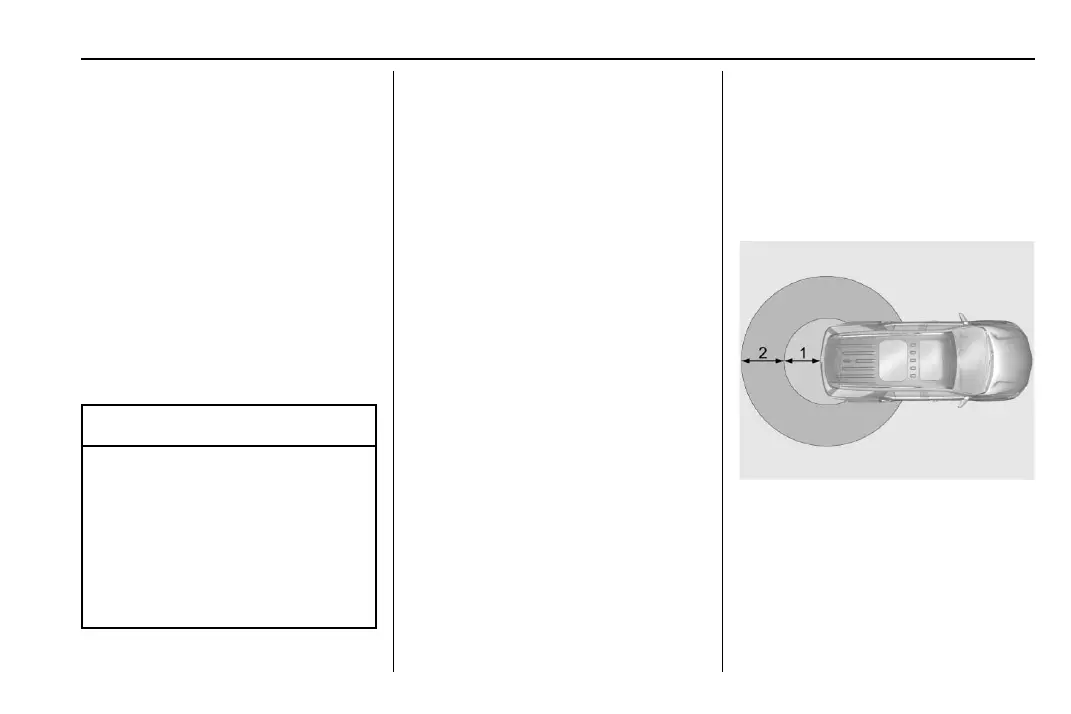
1. 1 m (3 ft) Hands-Free
Operation Detection Zone
2. 2 m (6 ft) Projected Logo
Detection Zone
The projected logo shows where the
kicking motion is to take place.















 To Next Page