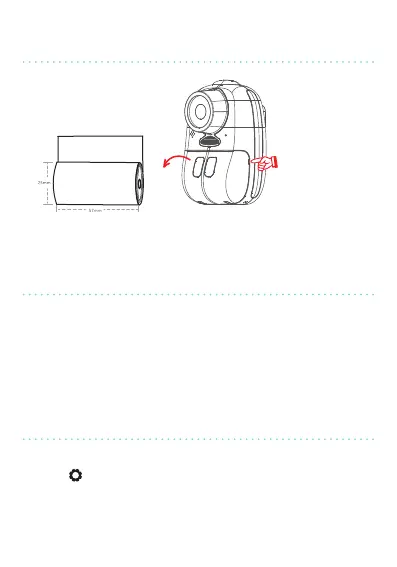
Inseron direcon
Place your
nger here and
pull to open
Insert the paper roll and close the compartment.
Now, press the ON/OFF key for 3 seconds to turn the camera on.
The device will turn on in photo mode.
A 4GB micro-SD/TF card is included and already installed in the
camera.
Without this card, you will only be able to print photos without
saving them and you will not be able to take videos.
The device is delivered with English as default. To select a
dierent language:
1. Press .
2. Using the Up and Down arrows, select “Language Se” by
pressing OK.
3. Choose your language and press OK again.
inseRting
the papeR Roll
staRt-up
changing the language
10


 To Next Page