Replacing the filters
When the filter reset indicator turns orange and flashes, it reminds you
to check and replace the filter. After replacing the filter, press and hold the
Filter Reset button for 3 seconds, and the filter reset indicator will go
out.
Note: If you need any help during replacing the filter, please feel
free to contact us via email : bulex@afterservice.vip
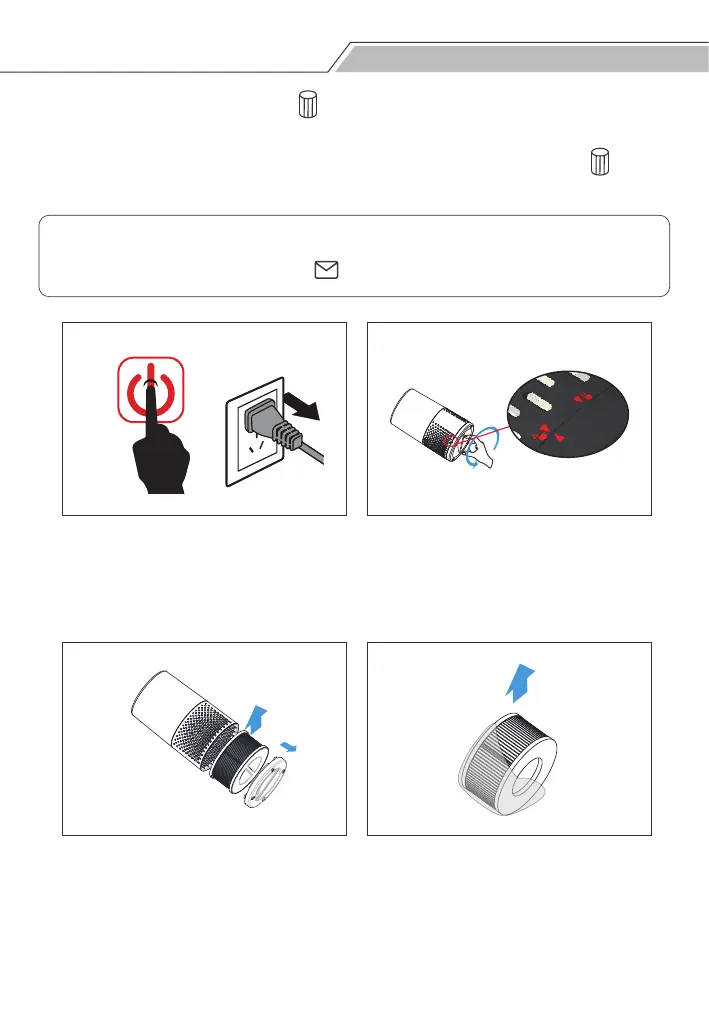
Step 1: Switch off the air purifier
and unplug it.
Step 2: Remove the bottom cover.
Hold the unit firmly and rotate the
bottom cover counterclockwise to
unlock and open it.
Step 3: Take out the used filter
according to the filter reset
indicator light status.
Discard the used filters.
Step 4: Remove all packaging
materials from the new filters.


 To Next Page