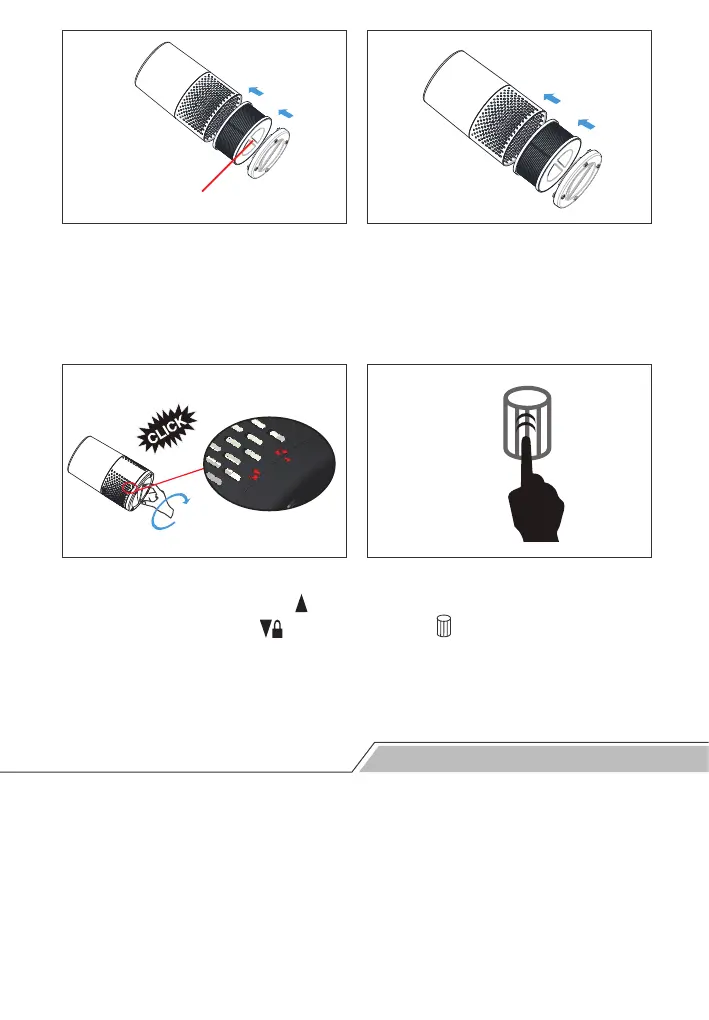
Step 5: Insert the new filter.
Make sure that the one with
cover is pointing towards
outside.
Step 6: Reattach the bottom
cover.
Step 7: Close the bottom cover.
Rotate clockwise until the“ ”in
bottom cover reaches “ ” and
upon hearing a “click” sound.
Step 8: Reset the filter timer.
Touch and hold the Filter Reset
button for 3 seconds to turn off
the Filter Reset button indicator
light and reset the filter timer
Towards outside
3 seconds
Storing the Air Purifier
Turn off the air purifier and unplug it from the wall outlet.
Clean the air purifier and the pre-filter (See chapter “Cleaning”).
Air dry all parts thoroughly before storing.
Wrap the filters separately in air-tight plastic bags.
Store the air purifier and filters in a cool, dry location.
Step 1:
Step 2:
Step 3:
Step 4:
Step 5:


 To Next Page