EasyManua.ls Logo

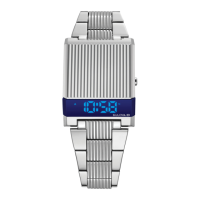
Bulova COMPUTRON 96C139 - User Manual

Bulova COMPUTRON 96C139
25 pages
Print Icon
To Next Page IconTo Next Page
Loading...
Computron User Manual BlackCVR_multi-lingual.indd 1 6/11/19 5:43 PM
Question and Answer IconNeed help?

Do you have a question about the Bulova COMPUTRON 96C139 and is the answer not in the manual?

Summary

Watch Features

Operating the Watch

Screen Off Mode

Displays time after inactivity or key press.

Normal Time Mode

Displays current time, date, and seconds.

Second Display Mode

Shows time with seconds or other data.

T2 Time Mode

Displays the second time zone.

Day Mode

Shows the current day of the week.

Date Mode

Displays the current date.

Time Setting Procedures

12;24 Hour Format Selection

Select between 12 or 24 hour display format.

Value Adjustment

Increase values or reset seconds to '00'.

Date Setting Procedures

Date Value Adjustment

Increase year, day, and month values.

T2 Time Setting

T2 Hour and Minute Adjustment

Set the hour and minute for the T2 time zone.

Important Notes

All LED Display Test

Pressing A and B keys simultaneously displays all LEDs.

AM;PM Distinction

Distinguish AM/PM in 12-hour format using A and P indicators.

Battery Life

Battery lasts at least 24 months with standard usage.

Bulova Service Locations

Bulova COMPUTRON 96C139 Specifications

General IconGeneral
BrandBulova
ModelCOMPUTRON 96C139
CategoryWatch
LanguageEnglish

Related product manuals