
 Need help?
Do you have a question about the Bulova COMPUTRON 97C110 and is the answer not in the manual?
Learn to switch between time, second, date, day, and T2 display modes using the B key.
Instructions for entering time setting mode and adjusting hour, minute, second, and 12/24 hour format.
Guide on how to enter date setting mode and adjust year, month, and day.
How to set the T2 (dual zone) time, including hour and minute adjustment.
Notes on all-LED display, default values for time, date, T2, and day display.
Bulova Service Department address and phone number in the United States.
Contact and address details for Bulova service in Canada.
Contact and address details for Bulova service in Mexico.
Contact and address details for Bulova service in the UK.
Contact and address details for Bulova service in Italy.
Contact and address details for Bulova service in Germany.
Contact and address details for Bulova service in Australia.
Contact and address details for Bulova service in Japan.
Contact and address details for Bulova service in Hong Kong.
Contact and address details for Bulova service in China.
 General
| Brand | Bulova |
|---|---|
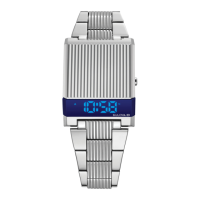
| Model | COMPUTRON 97C110 |
| Category | Watch |
| Type | Digital |
| Case Material | Stainless Steel |
| Water Resistance | 30 meters |
| Display Type | LED |
| Case Shape | Rectangular |
| Crystal | Mineral |
| Movement | Quartz |
| Strap Color | Black |
| Dial Color | Black |
| Features | Chronograph, Alarm |
| Case Width | 38.5 mm |
| Functions | Date, Chronograph |




 To Next Page