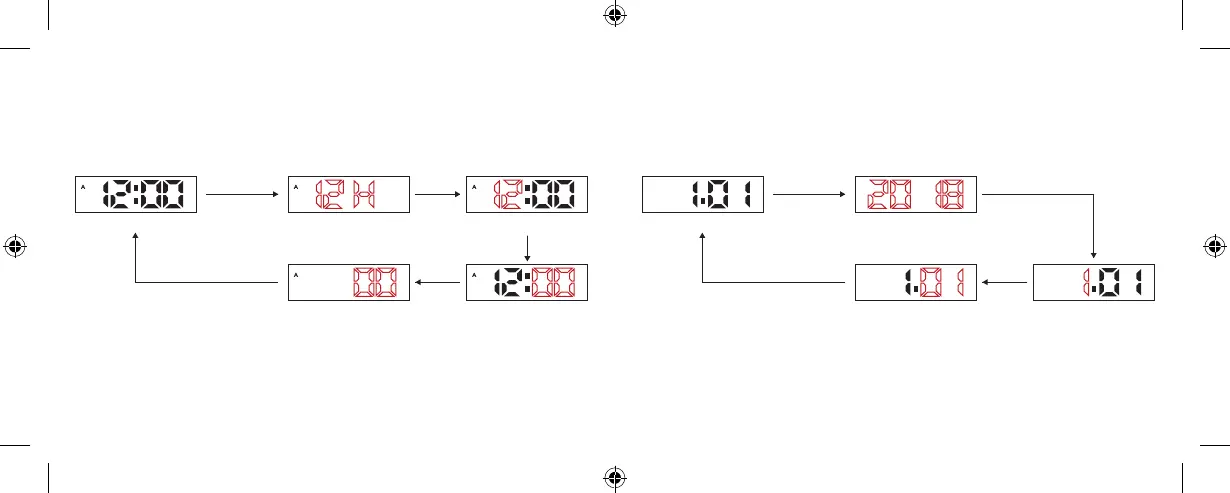
TIME SETTING
» In the Normal Time Mode, press (using the tip of a pen or other sharp object) and
hold A key for 3 seconds to enter the Setting Mode, and then press the A key to
move the flashing item as follows:
DATE SETTING
» In the date mode, press and hold the A key for 3 seconds to enter the setting
mode, and then press A key to move flashing item as follows:
» When 12 or 24 flashes, press B key to select 12 or 24 hour format.
» Press B key to increase value, press and hold B key to increase the value quickly.
» When setting seconds, press B key to reset the seconds to “00”.
» In setting mode, if there is no key operation for 10 seconds, it will return to the
Normal Time Mode.
» Press B key to increase the value, press and hold B key to increase the
value quickly.
» In the setting mode, if there is no key operation for 10 seconds, it will return
to Date Mode.
A key
A key A keyA key A key
A key
Press A key
for 3 seconds
Press A key
for 3 seconds
Normal Time Mode Date Mode
Second Day
12/24 Hour Format Year
Minute Month
Hour
A key
Computron User Manual BlackCVR_multi-lingual.indd 4-5 6/11/19 5:43 PM









 To Next Page