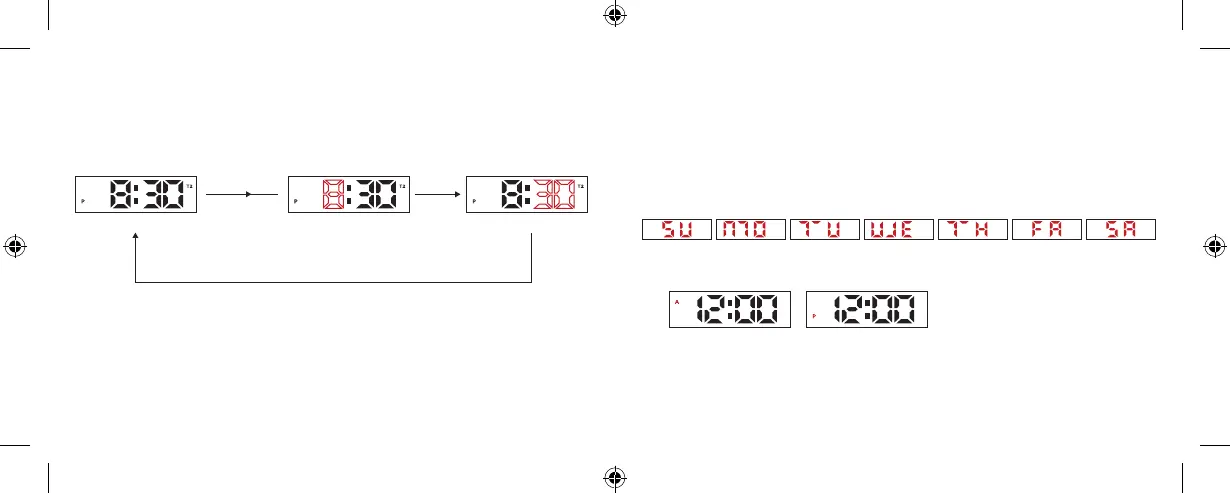
» In 12 Hour Format AM/PM time is distinguished by A and P as follows:
T2 TIME SETTING
» In the T2 Time Mode, press and hold the A key for 3 seconds to enter the setting,
and then press the A key to move the flashing item as follows:
NOTES
» Pressing A key and B key at the same time can display all the LEDs. If keys are
not pressed, the display will return to the original mode.
» Normal time default: AM12:00 00
» Date default: January 1st, 2019
» T2 time default: AM6:00 00
» The day is shown as follows:
» Press B key to increase the value, press and hold B key to increase the
value quickly.
» In the setting mode, if there is no key operation for 10 seconds, it will return
to T2 Time Mode.
A key
A key
Press A key
for 3 seconds
T2 Time Mode
AM PM
Hour Minute
» Battery Life (85%) :≥24 months
(Battery life is calculated according to LED illumination of 5 times a day and 3
seconds per time, for a total of 15 seconds per day)
Computron User Manual BlackCVR_multi-lingual.indd 6-7 6/11/19 5:43 PM









 To Next Page