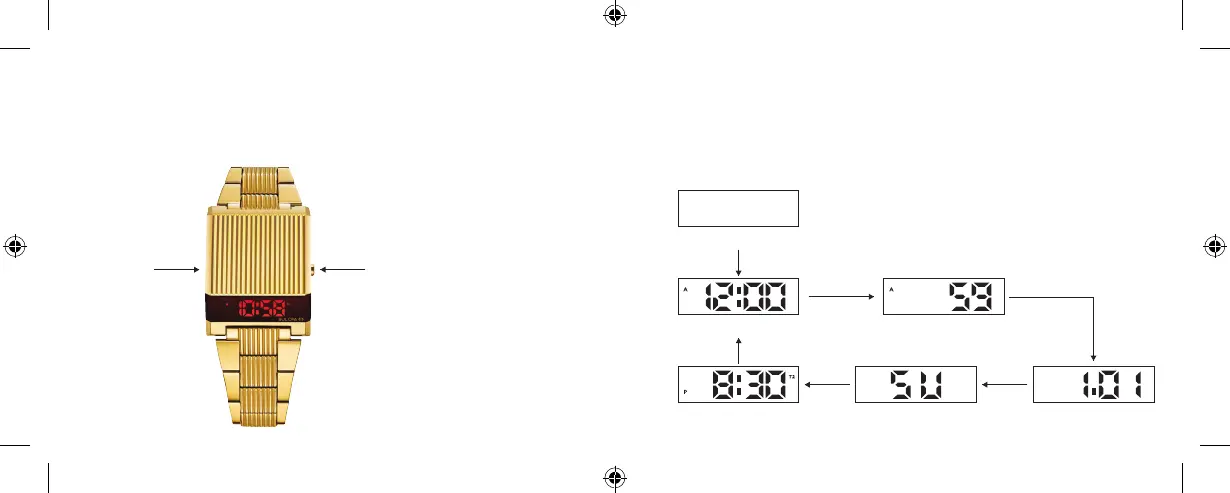
FEATURES
» Four digits LED display: hour, minute, second, month, date, day.
» 12/24 hour format.
» 81 years fully automatic calendar (from 2019 to 2099).
» Dual time.
Model: 96C139, 97C110, 98C135
B key
B key
B key B key
B key B key
Screen O Mode
Normal Time Mode Second Display Mode
T2 Time Mode Day Mode Date Mode
A KEY
(SET)
B KEY
(MODE/AD)
OPERATION
» In the Screen O Mode, press B key to display the normal time first.
» In Normal Time Mode, press B to shift the display mode:
hour, minute, second, date, day and T2 (dual zone) time.
» If there is no key operation for 5 seconds, it will enter into the Screen O Mode
automatically.
Computron User Manual BlackCVR_multi-lingual.indd 2-3 6/11/19 5:43 PM









 To Next Page