If the option was LoAd, pushing can choose among [±30mV, ±60mV,
±120mV, ±300mV y ±500mV ] as a maximum input range. If the option was V, can
choose among [1=±1V, 5=±5V, 10=±10V]. The rest of inputs are fixed range. On
figur3 14.2 is shown the 60mV range selection.
ENTER
Save the value in memory and goes to run mode
ESC
Cancel programming and goes to run mode.
If ProC has been choosed, pushing
ENTER
will appear the kind of signal [V=Volt,
mA=Current. If LoAd has been choosed, will appear the different ranges (see
diagram). If Pot has been choosed , when push
ENTER
directly store into memory
and pass to next step. Push
, until the desired option be displayed.
ENTER
Store the value in memory and goes to next step.
ESC
Cancel programming and goes to run mode
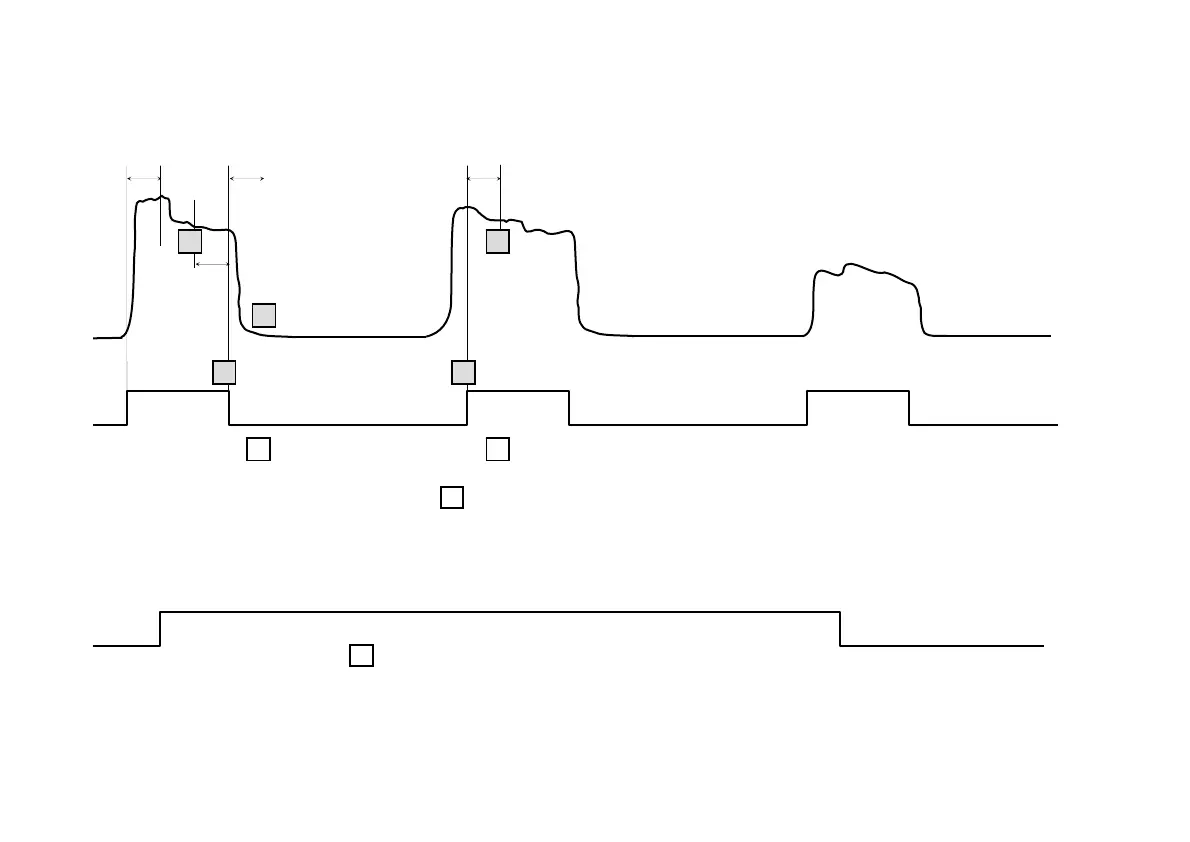
Reset peak and valley
values.
Restart the measuring
and output operation.
Restart the setpoints
operation if (26) was
OFF.
1
2
3
<10ms
<10ms
<10ms
3
Update display with
(net, gross, peak, valley and
peak-peak) and (hold).
Stop doing peak and valley
readings.
Keep the status of setpoints with
values on
If (26)=OFF or follows
if (26)=ON.
1
4
5
5
<10ms
1
SETPOINTS
OUTPUT
SIGNAL S&H
The diagram shows the function 27 use.
34
14
[14.2] Range selection
[14.1] Input range
TARE
HOLD LIMIT MAX MIN DATA
DSP2INP2 FLT STOREDSP1
INP1
2
1
4
3
TA RE
RESET LIMIT MAX/MIN DATA
ESC ENT ERTEACH
B
A
PROG
RUN
B
A
TARE
HOLD LIMIT MAX MIN DATA
DSP2INP2 FLT STOREDSP1
INP1
2
1
4
3
TARE
RESET L I M I T MA X/ M I N DA TA
ESC EN TER
PROG
TEACH
RUN


 To Next Page