B
TARE
HOLD LIMIT
MAX
DSP2 INP2 DSP1
INP1
TARE
RESET
LIMIT
ESC
PROG
TEACH
RUN MIN DATA
FLT STORE
2
1
4
3
MAX/MIN
DATA
ENTER
51
DIRECT ACCESS TO SETPOINT VALUE
The setpoint value can easily be modified by the direct access.
From the run mode (RUN) press
ENTER
key, to enter the
programming mode (PROG), and by pressing
LIMIT
key access to
the setpoint 1 value.
The setpoints value appears at each press of
ENTER
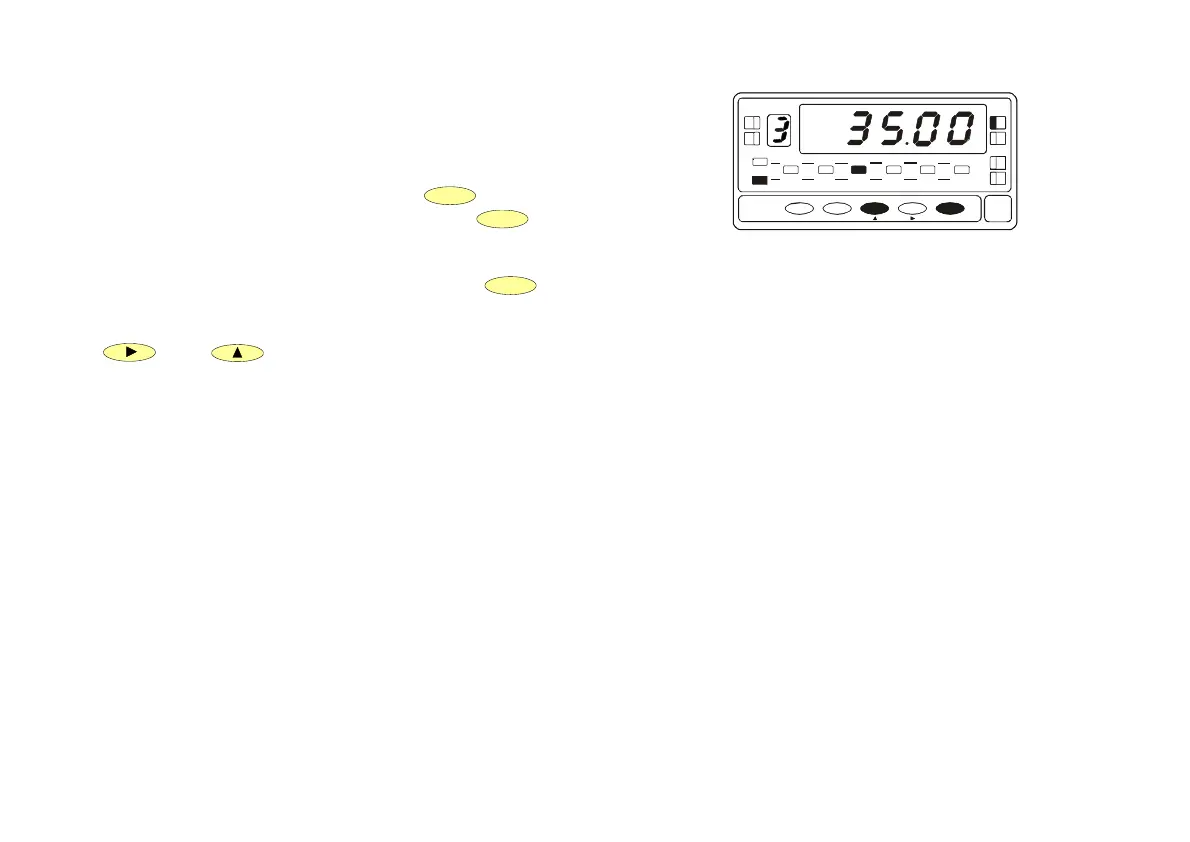
key. The led
indicating the setpoint number turns on, and the value in the main
display appears with the left digit blinking (See fig. 51 ). With
and keys configure the desired value between
"-9999" and "+9999".
If the programming access is blocked it is not possible modify the
blocked setpoint values, proced as shown in the manual to unlock
them.
Fig. 51 Setpoint configuration


 To Next Page