14
Installation of the hands-free car kit
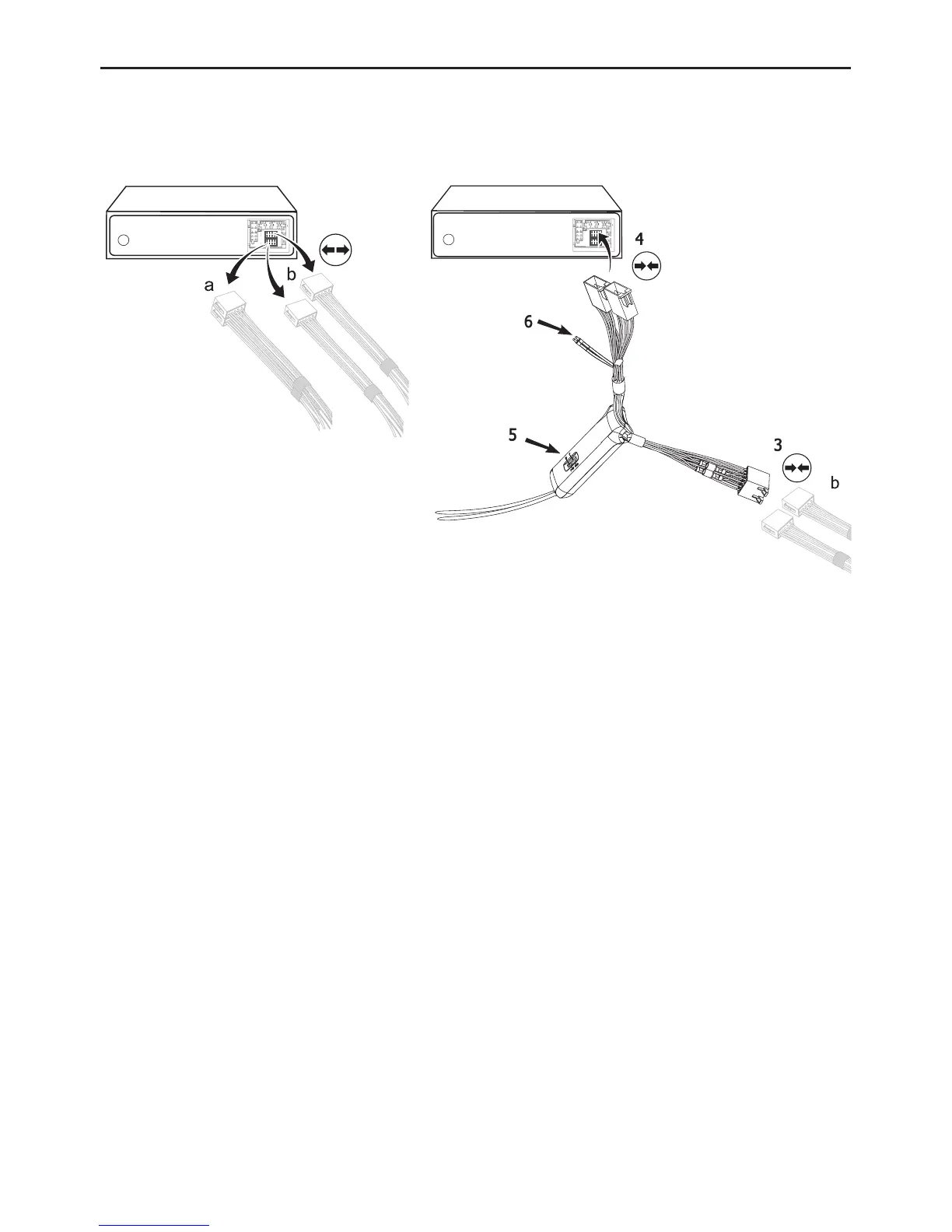
Now disconnect the (a) and/or the (b) loudspeaker connector from the speaker socket on the
radio at the back. Connect this connector with the suitable socket (3) on the AC 5120. Now con-
nect the plug (4) with the radio.
Depending on the switcher position (5), the voice of your conversation partner will be fed back
through either the front right speaker, the front left speaker, or through both of the front lou-
dspeakers. The ‘OFF’ position is to be selected if you connect the switch box to the radio using
the ‘Phone-IN’ cable (6).
The two ‘Phone-In’ cables are marked accordingly and must be plugged into the appropriate
connections on the radio (blue, green or yellow). In this regard, please refer to the instructions
concerning the connection configuration of your car radio in your car radio handbook. In lots of
radios, the volume level (feedback of your conversation partner) can be controlled via the phone
input and the selection of the loudspeaker.


 To Next Page