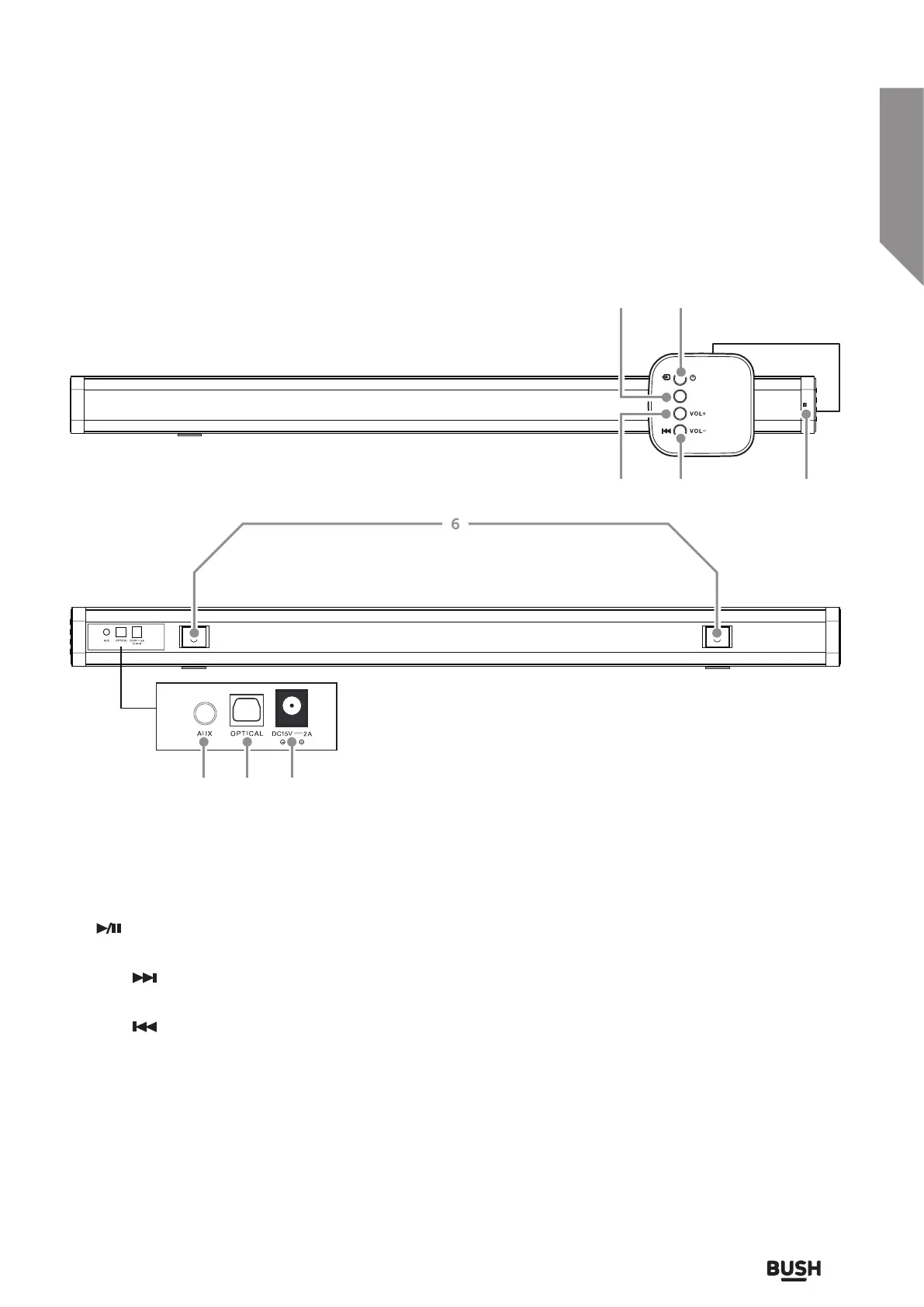
Getting to know your Soundbar
9
or online at www.argos-support.co.uk If you still require further assistance, call one of our experts on 0345 600 3021.
Getting to know your Soundbar
You’ll be up and running in no time
1. STANDBY/SOURCE button: Enter standby mode
or switch input mode between Bluetooth, AUX or
Optical.
2.
PLAY/PAUSE button: START, PAUSE or
RESUME Bluetooth playback.
3. SKIP
/ VOLUME+ button: Skip next button for
bluetooth playback / Press and hold for Volume +.
4. SKIP
/ VOLUME- button: Skip previous
button for bluetooth playback / Press and hold for
Volume -.
5. IR sensor: Aim the remote control in this direction.
6. WALL-MOUNT key holes: Use these key holes to
mount the soundbar to a wall.
7. AUX AUDIO INPUT (3.5mm): Connect the
analogue earphone output from a smartphone or
similar using a 3.5mm audio cable.
8. OPTICAL AUDIO INPUT: Connect the digital
optical audio output from a TV, DVD or Blu-ray
player.
9. MAINS POWER DC INPUT: Connect the supplied
power adapter.
12
6
7 8 9
543



 To Next Page