1
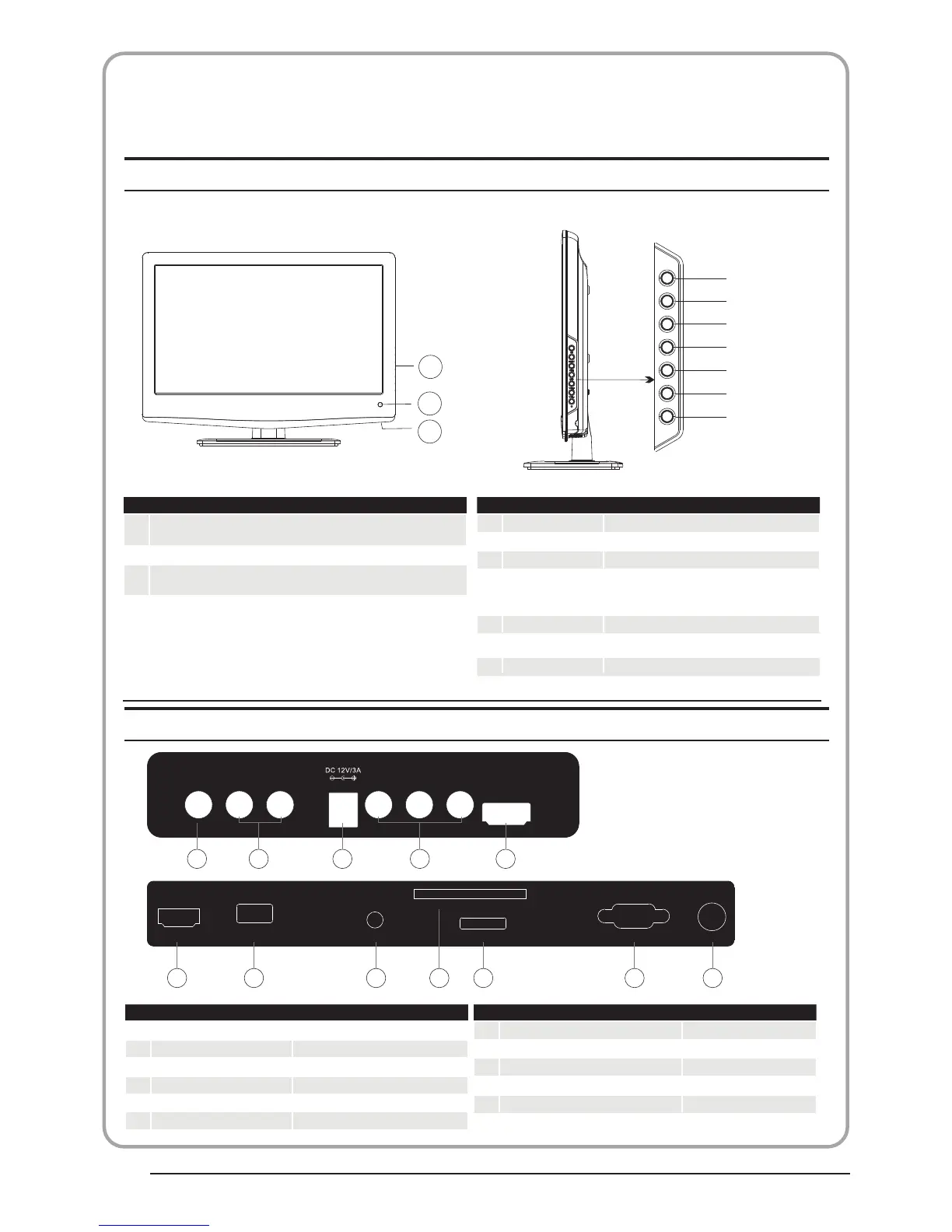
AV
2
input
3
YPbPr
input
4
input
5
input
input
7
SCART
input
8
PC AUDIO input
9
L/R AUDIO
Intput
10
11
Input
12
input
3
1
2
Front control panel
1
2
3
Remote control sensor.
Indicator LED:
BLUE:POWER ON. RED STAND BY.
Key board.
Rear/Side Sockets
1
SOURCE
Display the input source menu.
MENU
Display main MENU.
3
4
CH+/CH-
In TV mode,press CH+ or CH- to change
the channel up and down.
In MENU, press CH+ or CH- to select items .
In standby mode, it can Turn on the TV.
STANDBY
2
VOL+/VOL-
Adjust sound level.
In MENU,adjust the item that you Selected.
5
Remote Control
SOURCE
MENU
CH+
CH-
VOL+
VOL-
STANDBY
AV L R Y
Pb
Pr
HDMI2
1 2 3 4 5
HDMI1
USB
PC AUDIO
VGA ANT
SCART
COMMON INTERFACE (CI)
6 7 8
10
9
11
12
DC Power Source
HDMI2
6
input
HDMI1
USB
COMMON IN INTERFACE(CI)
VGAINPUT
ANT
Intput
P.09
BUSH|Full HD 1080p LED LCD TV | User Manual | Helpline:0845 604 0105



 To Next Page