2 3
Product Overview
1
9
8
6
5
2
3
4
7
10
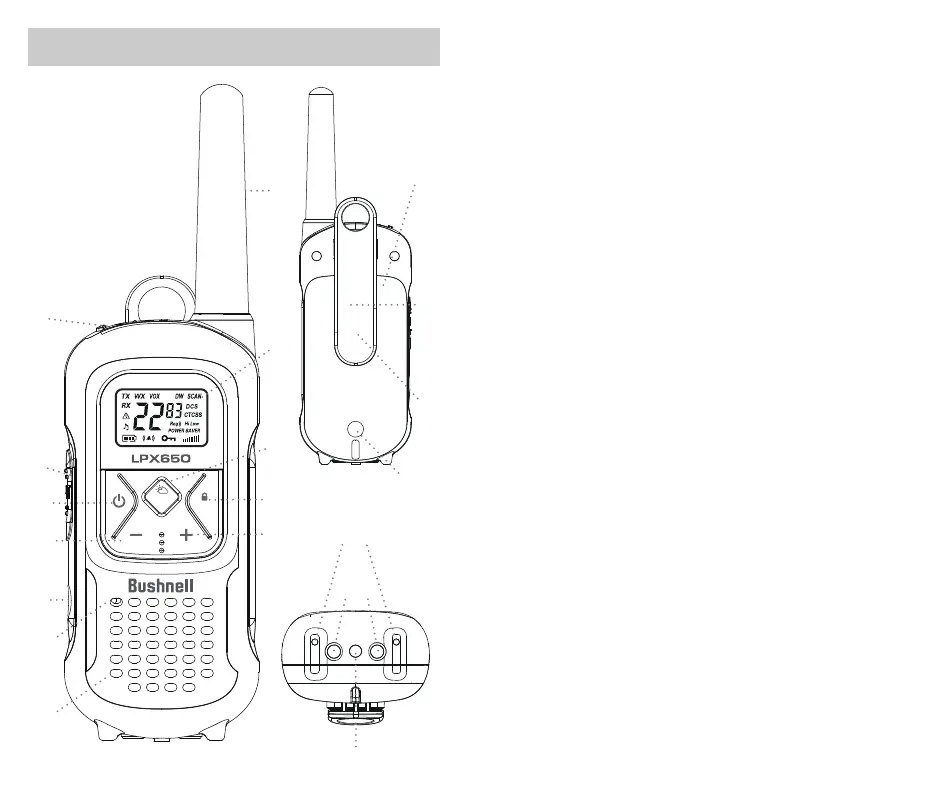
1. Microphone/Earphone/Charge Jack
2. PUSH-TO-TALK (PTT) Button
• Press and hold to transmit your voice
3. Power Button
• Press and hold to turn the unit On or Off
4. - Button
• Press to decrease volume
• Press and hold to set Hi or Lo Transmit Power Level
5. LED/S.O.S Flashlight Button
• Press to use the LED ashlight /
turn off the ashlight or S.O.S. Flashlight function
• Press and hold to activate S.O.S. Flashlight function
6. MIC (Microphone)
7. Speaker
8. Antenna
9. Backlit LCD Display
10. Menu/Weather Button
• Press to display the menu
• Press and hold to listen to or exit NOAA All Hazards Radio channels
11. Call/Lock Button
• Press to send Ringtone to other radios
• Press and hold to activate or deactivate Key Lock feature
12. + Button
• Press to increase volume
• Press and hold to use or stop Monitor feature on the selected channel
13. Battery Compartment Cover
14. Belt Clip
15. Battery Door Screw (Behind the clip)
16. Battery Door Screw
17. Water Detection sensors
18. Charging contacts (for charging dock)
19. LED Flashlight
MENU
CALL
11
12
13
14
15
16
17
18
19



 To Next Page