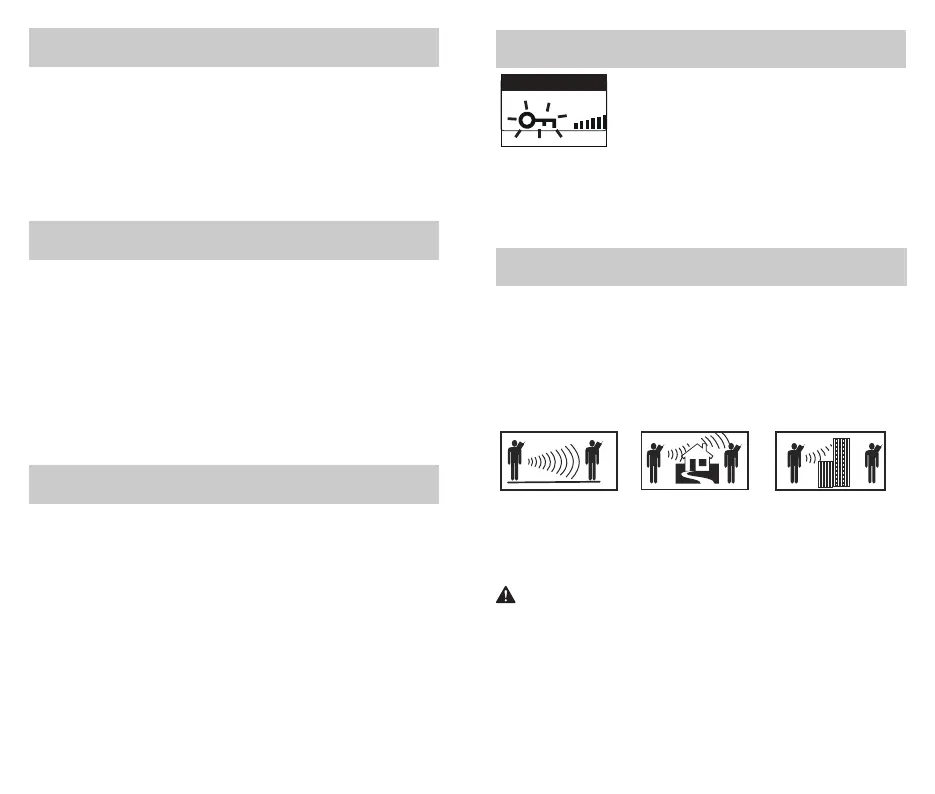
Transmitting range
The talk range depends on the environment and terrain. In general the radio
can reach further in wide open spaces, without obstructions such as hills or
buildings. It will be affected by concrete structures, heavy foliage and by
operating radios indoors or in vehicles. Don’t try to use two radio units
which are less than 5 m (16 feet) apart. Otherwise, you may experience
interference.
IMPORTANT SAFETY
WARNING:
To reduce radio frequency exposure when you are using your hand-held,
hold the unit at least 5 cm (2 inches) away from your face.
Optimal Range
Outdoors Flat,
open areas
Medium Range
Outdoors Buildings or
trees Also near
residential buildings
Minimal Range Outdoors
Dense foliage or
mountains. Also inside
some buildings
Call Button
Press and release the Call button to alert others that you are calling.
The other person will hear a 3 seconds call tone.
This tone is used only to establish voice communications.
NOTE: See page 20 on how to select between 15 call tone settings.
LED/S.O.S. Flashlight
Press and release the LED/S.O.S Flashlight button below the Talk
button to use the LED flashlight located at the bottom of the radio.
To activate S.O.S. Flashlight function, press and hold the LED/S.O.S
Flashlight button to turn on. Press and release to turn off the flashlight or
S.O.S. function.
NOTE: In order to prevent misoperation and save power, the flashlight will
automatically turn off after 5 minutes
Auto Squelch/Maximum Range
Your radio will automatically shut off weak transmissions and unwanted
noise due to terrain, conditions or if you’ve reached your Maximum Range
limit.
You can turn off auto squelch (or turn on maximum range extender),
allowing all signals to be received and extending the maximum range of
your radio.
To turn maximum range extender on (Turn off auto squelch), press and hold
the + button for at least 3 seconds to turn on the maximum range extender.
To turn maximum range extender off (Turn on auto squelch), press and hold
the + button to turn off the maximum range extender.
Key Lock
To turn the lock on or off: Press and hold the Lock Button for 3 seconds.
A double beep sound is used to confirm your lock on or off request. When in
Lock mode, the Lock icon will be displayed.
Key Lock Icon
12 13
The Lock function locks the Menu button and the
press-and-hold function of + or - buttons to prevent
accidental operation.



 To Next Page