Operation - Charge
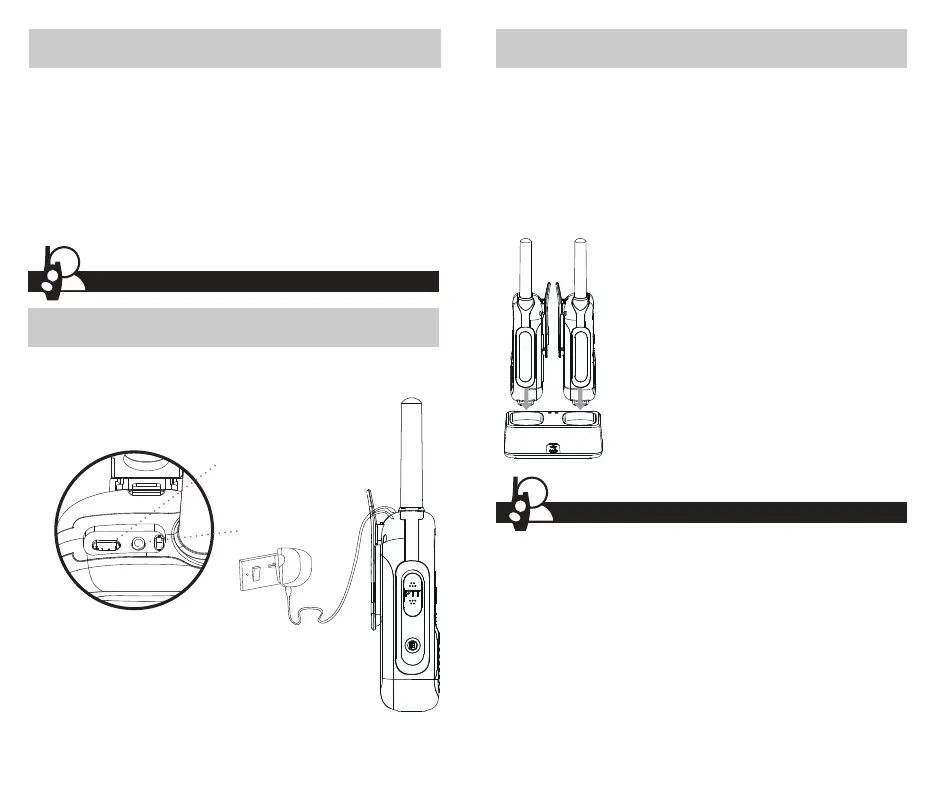
To charge batteries in radio
1. Check to see that the batteries have been inserted properly.
2. Insert the USB-C cable into the charge jack located at the top of the
radio.
3. Plug the cable into USB-compatible power port.
NOTE:
• Use only the supplied rechargeable batteries for
recharging your Bushnell radio.
• Bushnell recommends your radio is turned off while being
charged.
• The batteries can take more than 12-14 hours to fully charge.
• Always use the supplied charging cable for optimal charging
performance.
8 9
NOTE:
• Use only the supplied rechargeable batteries for
recharging your Bushnell radio.
• Bushnell recommends your radio is turned off while
being charged.
• The batteries can take more than 12-14 hours to
fully charge.
• Always use the supplied charging cable for optimal
charging performance.
LPX650 Charging dock
Input: 5V DC 1000mA
Output: 2 x (5V DC 400mA)
1. Press and hold the Power button to turn on your radio.
2. Press the Menu button once, the current channel number flashes on
the LCD Screen.
3. Press the + or – button to select a channel.
NOTE: Both radios must be tuned to the same channel/privacy code
to communicate.
4. Press the Talk button to confirm the channel setting.
5. Press and hold the Talk button while speak into the microphone.
6. When finished talking, release the Talk button and listen for a
response.
Operation - Quick Start
To charge radio(s) in charging dock
1. Insert radio(s) into charging dock as shown.
2. Insert the USB-C cable into jack on back of charging dock.
3. Plug the cable into USB compatible power port. For pluggable
equipment, the socket-outlet shall be installed near the equipment
and shall be easily accessible. If charging light is not on, check
position of radio. Radio should be upright. The charge indicator light
will stay on (Red) as long as the radio is in the charging well, and the
light will go off when the charging is complete.
Floating Radio
The radio is designed to float when in water, the LED light will flash to
assist you in locating the radio when in water.
Do not leave the radio floating in water permanently. This could cause
premature corrosion of the battery contacts and other damage.
NOTE: This radio floats with included NiMH batteries. It may not float with
some other AA batteries.
Mic/spk jack
Charge jack



 To Next Page