Support: (800) 398-4416,ext. 2
Mon - Fri: 6am - 10pm E
Sat - Sun: 8am - 8pm ET
Email: support@butterflymx.com
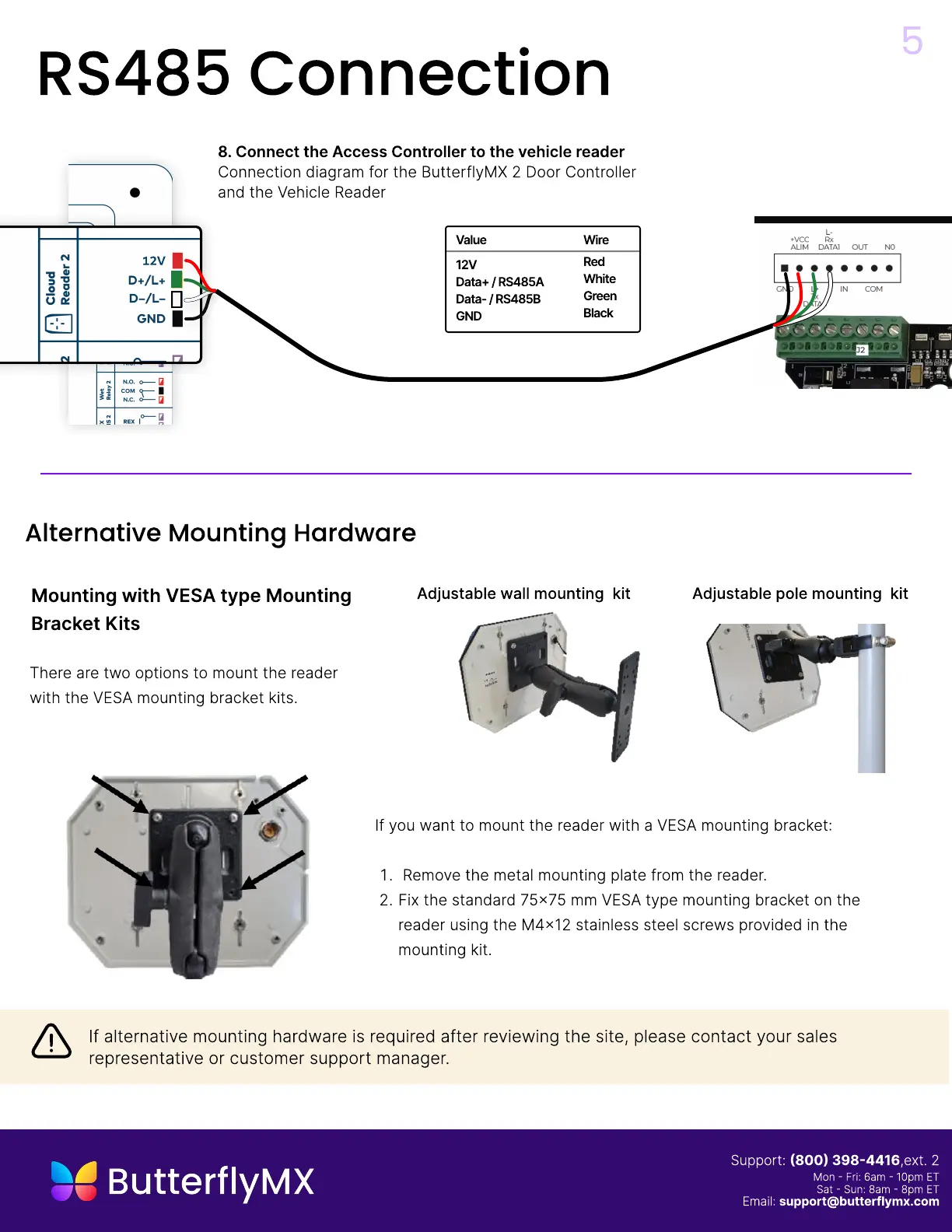
If you want to mount the reader with a VESA mounting bracket
Remove the metal mounting plate from the reader.
Fix the standard 75x75 mm VESA type mounting bracket on the
reader using the M4x12 stainless steel screws provided in the
mounting kit.
There are two options to mount the reader
with the VESA mounting bracket kits
Mounting with VESA type Mounting
Bracket Kits
Adjustable wall mounting kit Adjustable pole mounting kit
5
Alternative Mounting Hardware
If alternative mounting hardware is required after reviewing the site, please contact your sales
representative or customer support manager.
RS485 Connection
8.
C
onnect the Access
C
ontro
ll
er to the
v
ehic
l
e rea
d
er
C
onnection diagram for the
B
utterflyM
X
2
D
oor
C
ontroller
and the Vehicle Reader
W
ire
R
e
W
hit
G
ree
B
l
ack
12
D
ata
+
/
R
S
485
D
ata
-
/
R
S
485
GND
Va
l
ue


 To Next Page