EasyManua.ls Logo

BUTURE Beta03 - Troubleshooting Indicator Lights

BUTURE Beta03
5 pages
Print Icon
To Next Page IconTo Next Page
To Previous Page IconTo Previous Page
Loading...
+
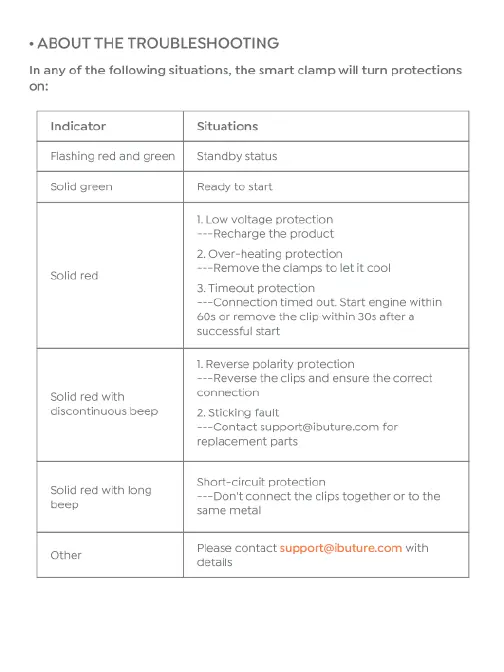
ABOUT
THE
TROUBLESHOOTING
In
any
of
the
following
situations,
the
smart
clamp
will
turn
protections
on:
Indicator
Situations
Flashing
red
and
green
|
Standby
status
solid
green
Ready
to start
1.
Low
voltage
protection
-Recharge
the
product
2.Over-heating
protection
-Remove
the
clamps
to
let
it
cool
3
Timeout
protection
~Connection
timed
out.
Start
engine
within
605
or
remove
the
clip
within
30s
after
a
successful
start
Solid
red
1.Reverse
polarity
protection
-Reverse
the
clips
and
ensure
the
correct
Solid
red
with
connection
discontinuous
beep
2.
Sticking
fault
-Contact
support@ibuture.com
for
replacement
parts
Short-circuit
protection
-Don't
connect
the
clips
together
or to
the
same
metal
Solid
red
with
long
beep
Please
contact
support@ibuture.com
with
omer
detalls

Related product manuals