EasyManua.ls Logo

BUTURE VC10 - HOW TO USE; Charging Procedures and Indicators

BUTURE VC10
17 pages
Print Icon
To Next Page IconTo Next Page
To Previous Page IconTo Previous Page
Loading...
If
you
have
any
questions.
email
to
tech-support@ibuture.com
5.HOW
TO
USE
5.1
Charging
“When
using
a
new
battery
or
using
it
for
the
first
time
after
long-term
storage,
please
fully
charge
the
battery
first.
“When
storing
and
not
using
the
vacuum
cleaner
for
a
long
time,
please
ensure
that
it
is
charged
and
discharged
at
least
once
every
three
months.
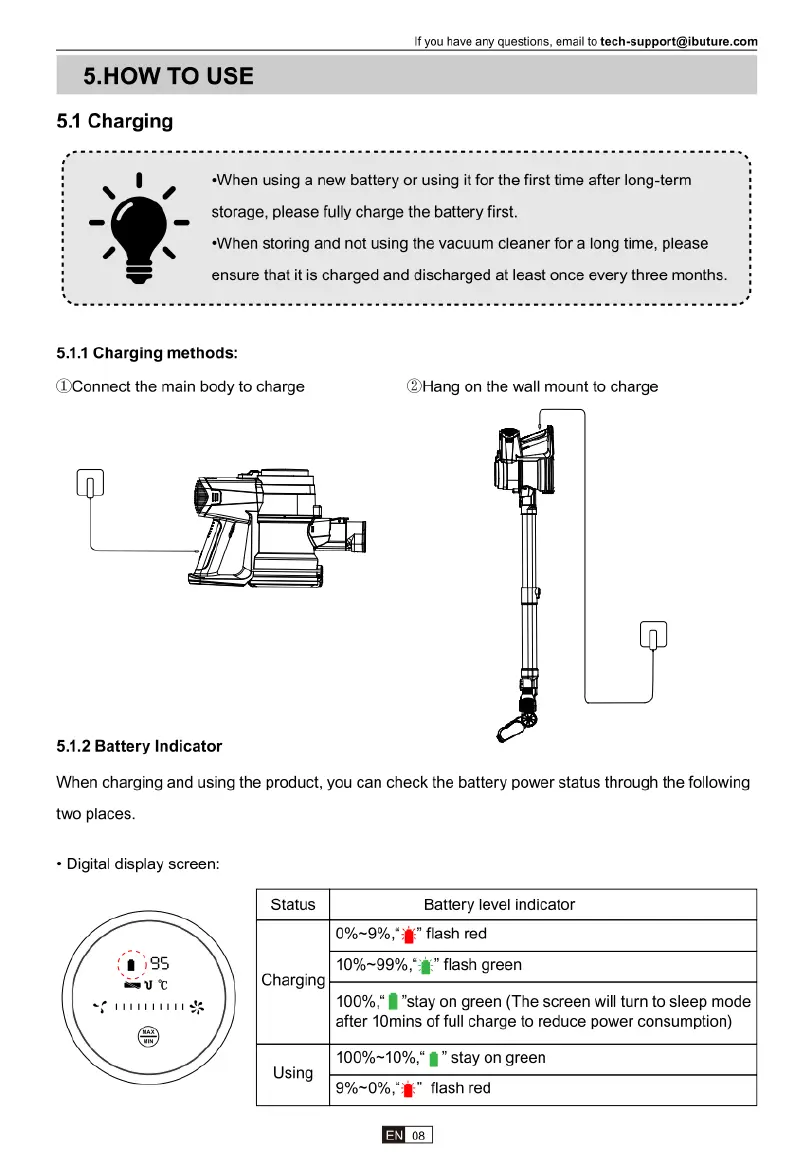
5.1.1
Charging
methods:
(DConnect
the
main
body
to
charge
5.1.2
Battery
Indicator
When
charging
and
using
the
product,
you
can
check
the
battery
power
status
through
the
following
two
places.
«
Digital
display
screen:
Status
Battery
level
indicator
0%~9%,"
"
flash
red
10%~99%,"
flash
green
Charging
100%,"
fl"stay
on
green
(The
screen
will
turn
to
sleep
mode
after
10mins
of
full
charge
to
reduce
power
consumption)
100%~10%"
§
"
stay
on
green
Usin,
9
flash
red

Related product manuals