EN
37
3.8.1 Menu: SETUP
General settings:
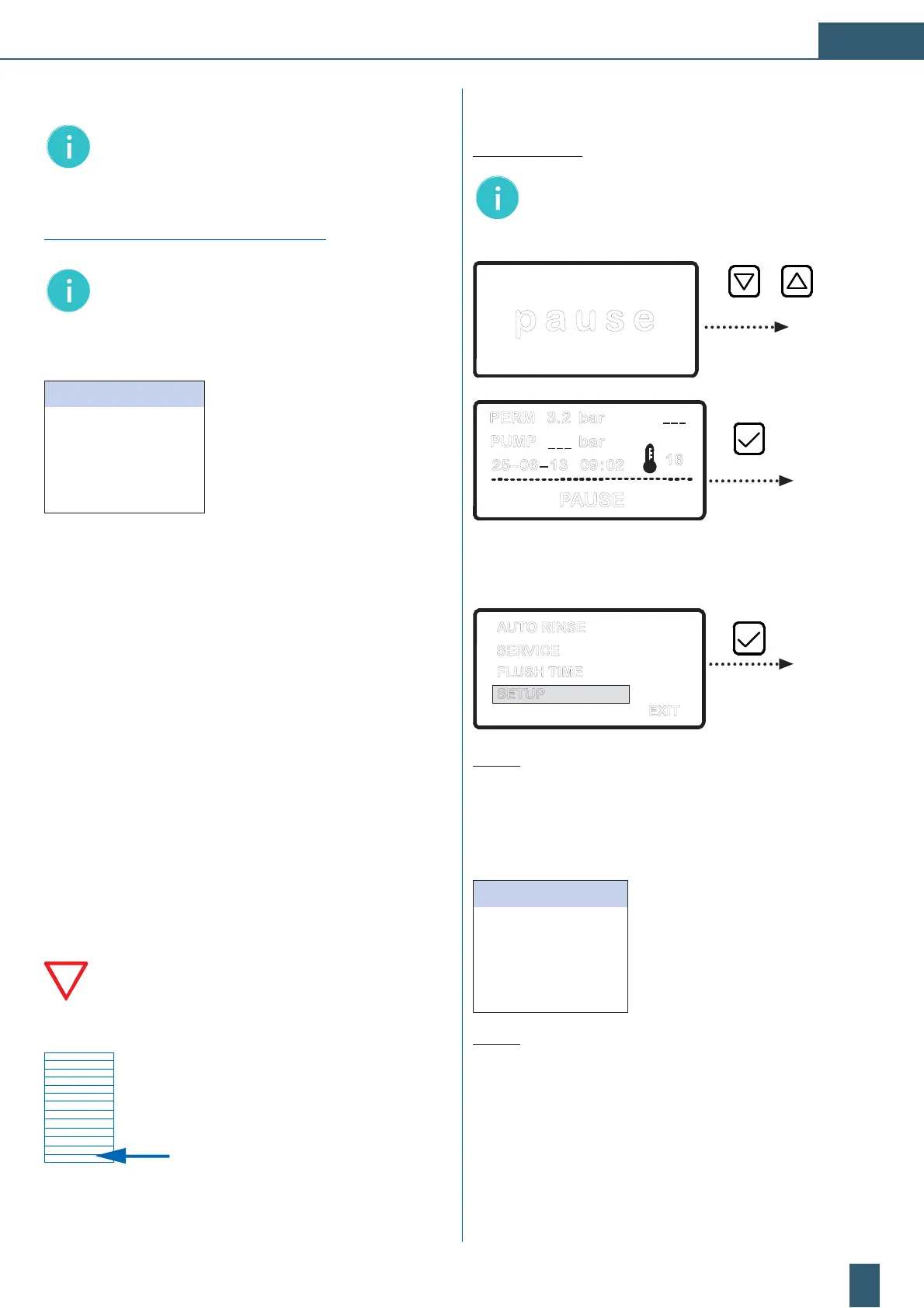
Note: The change in the programming menu is avai-
lable from both the main screen “pause“ as well as
from the detail overview display “PAUSE“.
p a u s e
PERM 3.2 bar
PUMP _ _ _ bar
25– 06 – 13 09 : 02
PAUSE
16
_ _ _
D Confirm with the [] button to shift into the
programming menu.
EXIT
SERVICE
FLUSH TIME
AUTO RINSE
SETUP
Fig. 10: Main selection menu: “SETUP“
The “SETUP“ selection menu appears:
D The menu item “DATE“ is active.
DATE / TIME
Date ; time
CONDUCTIVITY / TDS
Conductivity value / TDS (ppm)
OPERATION MODE
Pressure tank operation: Yes/No
LANGUAGE
Setting of the menu language
BACK
Quit menu and return to selection menu
Fig
. 11: Display of the activated “SETUP“ menu.
Perform the general settings of the “SETUP“ selection menu in
accordance to: Fig. 12, Fig. 13, Fig. 14.
The description of the parameter setting “FLUSH TIME“ is gi-
ven at Fig. 14.
3.7 Device settings/visualisation
Note: All of the programable settings described in Part
3.7 can only be accessed and activated in the “PAUSE”
mode.
Visualisation of the menu screens/displays:
Note: The illustrations in the software schemes serve
for a better overview and are subsequently described.
In each menu screen the blue light bar highlights the
current active menu item or value set.
RINSE
ACTIVE
SERVICE
INACTIVE
FLUSH TIME
INACTIVE
SETUP
INACTIVE
EXIT
3.8 Main menu
The menu consists of 4 selectable menu items in which the
subsequent settings may be effected:
RINSE:
s¬-ODE¬FOR¬AUTOMATIC¬mUSHING
SERVICE:
s¬3ETTINGS¬OF¬SETPOINT¬AND¬LIMIT¬VALUES¬FOR¬SERVICE¬PURPOSE
FLUSH TIME:
s¬3ETTING¬OF¬mUSH¬TIME¬AFTER¬THE¬COMPLETION¬OF¬
permeate production
SETUP:
s¬'ENERAL¬DEVICE¬SETTINGS¬DATE¬TIME¬LANGUAGE¬LIMIT¬VALUES¬
operating mode).
The recommended target values of all settings
are documented in the form “Form for set values
of BWT PERMAQ
®
compact 2 - 6“ (see Part 7.1).
Document the parameters after you have set all of
the data at the device.
Please use the template at the end of the operating
instructions.


 To Next Page
 Loading...