Coast
al Amusements Inc. | Ring Toss
20
INTERNET OPTIONS INSTRUCTIONS
Y
our machine’s software contains an option to connect through the internet to Coastal
Amusements. This will allow the game to report its accounting information and settings to us
and suggest changes to improve income generation. It will also allow the game to receive any
software updates / bug fixes without the need to have the software shipped to you. The next
pages will explain how to enable this setup.
To enter the configuration screen, connect a keyboard to the motherboard. Then enter the
menu and select the option titled ‘INTERNET OPTIONS’. Alternatively, you can just press the
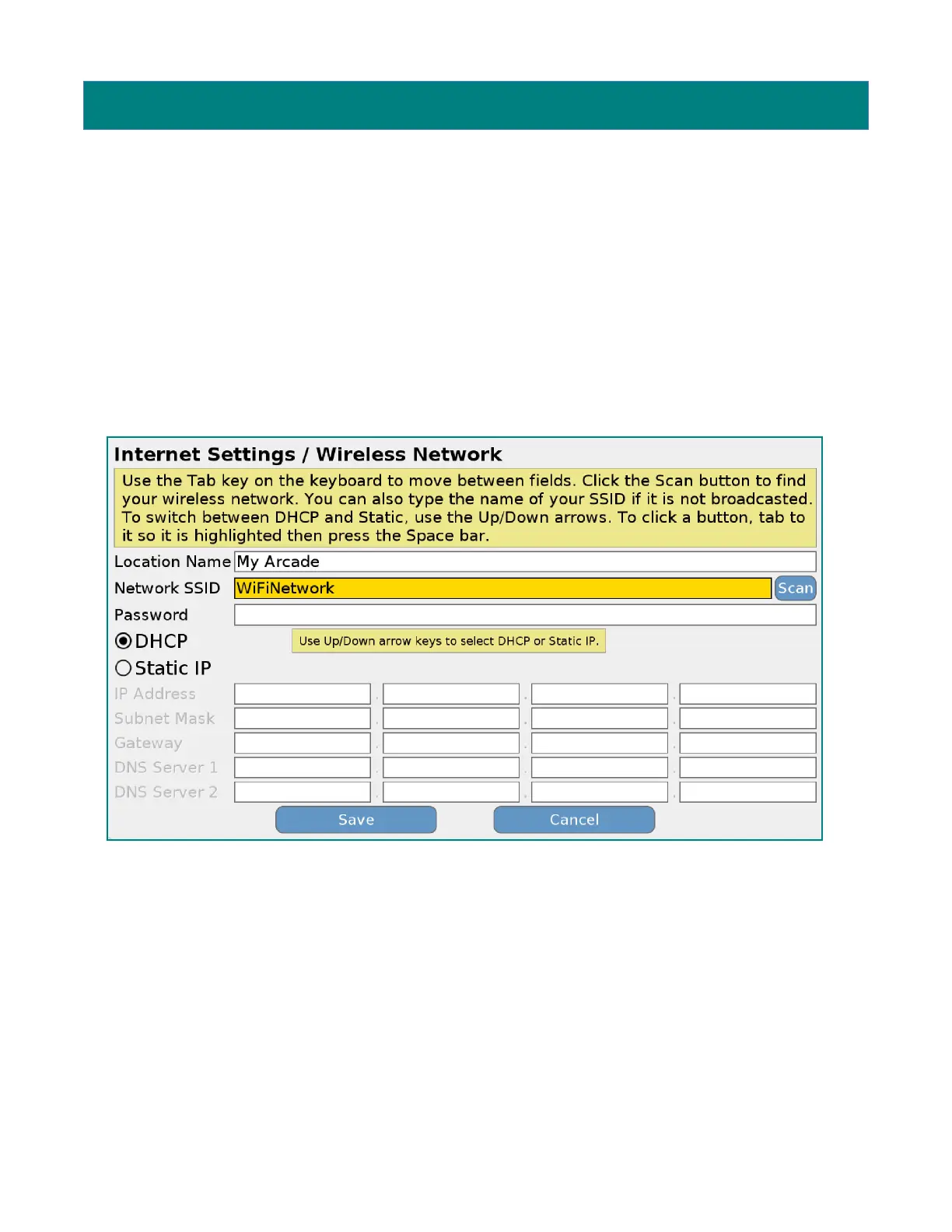
Escape key on the keyboard. You will be presented a screen similar to this one:
In the ‘Location Name’ field, enter your store name and location for reference (i.e. Chuck E
Cheese – Baltimore MD).
The Network SSID will show the first wireless network found. If this is not your preferred
network, enter the name manually or press ‘TAB’ until the ‘Scan’ button is highlighted in yellow
and then press space. (If you ever need to ‘TAB’ back to a previous item, hold down ‘SHIFT’
when you press ‘TAB’). You will then see a screen similar to the following:


 To Next Page