7
UK
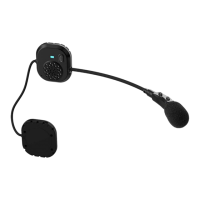
Pairing to another Caberg Pro
Speak Evo
Unit
Start pairing on both
Caberg Pro
Speak
Evo Unit
Unit is on: Vol- for 5 sec
Red and Blue LED blink
alternate
Voice: “PAIRING” when start,
“PAIRING successful” when
finish
How to use the intercom
Open/close Intercom
from Caberg Pro
Speak Evo
Vol- short press
Open/close intercom
from other Model/
Brand Intercom
Follow the indication in the
manual to open/close a
phone call.
Pairing to another Model/Brand Intercom
It is possible to pair Caberg Pro Speak Evo with
another Model/brand intercom using the Universal
Intercom feature.
Start Universal
Intercom Pairing on
Caberg Pro Speak
Evo
Vol- for 5 sec
Red and Blue LED blink
alternate.
Voice “PAIRING” when start,
“PAIRING successful” when
finish.
Start pairing on
other Model/Brand
intercom as phone
Follow the manual of other
Model/Brand Intercom to
pair a phone
Special Action
Reset all pairing Unit is power o: Vol+ and
Vol- for 7 sec (full blue LED
for 3 sec)
Enable auto answer Vol- for 7 sec
Voice prompt: “Enable”
Disable auto answer Vol- for 7 sec
Voice prompt: “Disable”
Change language of the voice
announcements
Turn on the unit.
Keep pressed the + button for more than 7 seconds.
Voice: “Battery status” in the various languages
available. Keep pressed the button till you find the
desired language.
Release the + button.
Sequence of the languages available: English
(default language), Spanish, Italian and French.



 To Next Page