5
www.cablematters.com
4-Port USB 3.0 Switch with Remote Control
3.3 Connection Instructions
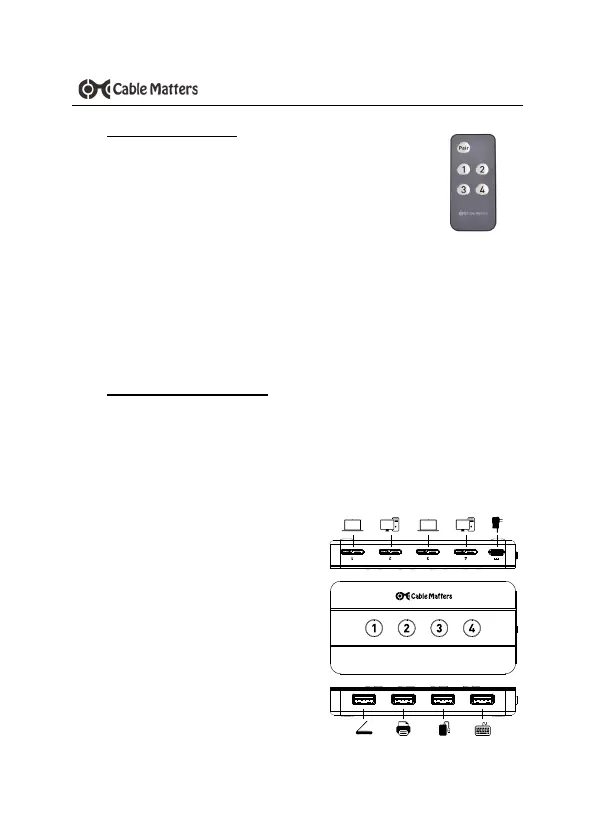
1) Power off all source equipment
2) Make sure the switch is “OFF” before connecting any device
3) Connect the AC adapter to a wall outlet
4) Connect the switch box to up to 4 USB-equipped computers
with the provided Micro USB to USB A Cable
5) Connect the switch box to up to 4 USB peripherals through the
USB-A ports
3.2 Remote Installation
Remove the insulating tab from the end of the battery and
check that the battery is installed correctly
Troubleshooting tips:
• Replace the battery
• Make sure the Switch is turned on and remote control
is not turned off on the Switch
• The included remote control is already paired to the switch by
default. To manually pair a replacement remote control, power on
ONLY the switch to pair and hold down the Pair button on the
remote control for 3 seconds until the remote control LED stops
flashing. If multiple switches are used in the same room, power off
all other switches before pairing.


 To Next Page