
 Need help?
Do you have a question about the cable matters 202060 and is the answer not in the manual?
Provides an overview of the product's features and installation process.
Legal information regarding trademarks and third-party references used in the manual.
Details the device's compliance with FCC rules and operating conditions.
Lists all items included in the product packaging for verification.
Explains the primary function and benefits of the USB 3.0 switch.
Highlights the key functionalities and capabilities of the USB 3.0 switch.
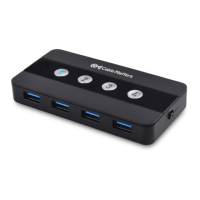
Visual representation of the switch's ports, buttons, and indicators for easy identification.
Instructions for installing and pairing the remote control with the USB switch.
Step-by-step guide for physically connecting the switch to computers and peripherals.
Provides solutions for common issues encountered during setup and operation.
Details technical data including connections, dimensions, environmental, and warranty.
Information on how to obtain technical support and contact the manufacturer.
Details the terms and conditions of the product's limited one-year warranty.
Legal disclaimers outlining the manufacturer's liability regarding product use.
 General
| Brand | cable matters |
|---|---|
| Model | 202060 |
| Category | Switch |
| Language | English |

 To Next Page
