EN
16
Owner’s manual
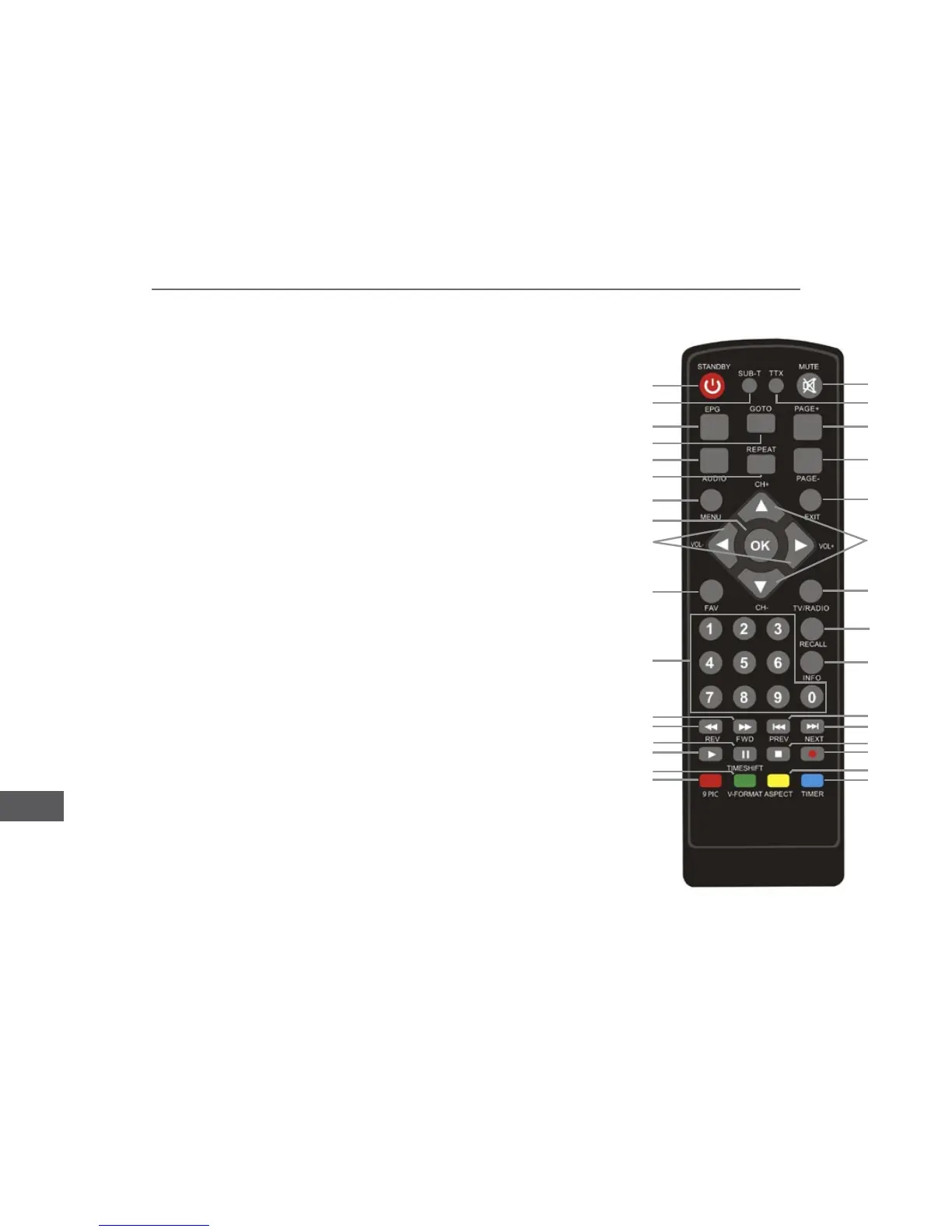
Remote control
1. Power button
2. SUB-T button: subtitle options
3. TTX button: display teletext
4. MUTE button: mute/unmute
5. EPG button: display Electronic Program Guide
6.
7. PAGE + : go to next menu
8.
9. REPEAT button: turn on/off repeat function
10. PAGE - : go to previous menu
11. MENU: display main menu screen
12. EXIT button: return to the previous menu or exit the menu
13.
14.
15. CH - / CH + : previous/ next channel
16. FAV button: display favorite program list
17.
18. Number key
19. RECALL button: return to the last selected channel
20.
21. REV button: fast backward
22. FWD button: fast forward
23. PREV button
24. NEXT button
25. Play
26. Pause
27. Stop
28. Record
29. 9 PIC button: preview of 9 subsequent channels
30.
31. ASPECT button: switch the aspect ratio
32. TIMER button
1
2
3
4
5
6
7
8
9
10
11
12
13
14
15
16
17
18
19
20
21
22
23
24
25
27
28
29
31
32
30
26



 To Next Page