EasyManua.ls Logo

Cabletech URZ0336 - User Manual

Cabletech URZ0336
56 pages
Go to English
Print Icon
To Next Page IconTo Next Page
Loading...
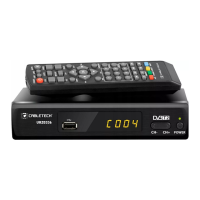
DVB-T2 HD tuner
for ground-based television
URZ0336
Manual de utilizare
Instrukcja obsługi
User's manual
Bedienungsanleitung

Questions and Answers

  • C
    Carolyn RamirezAug 3, 2025
    Why is my Cabletech URZ0336 TV Tuner remote control not working?
    • S
      Suzanne PattersonAug 3, 2025
      If your Cabletech TV Tuner remote control isn't working, it could be due to several reasons: the device might be turned off (turn it on), the remote might not be pointed correctly (point it at the device within 8 meters and 30° horizontally and vertically), there might be obstacles (remove them), or the batteries might be dead (replace them).
  • K
    knightsarahAug 10, 2025
    What to do if my Cabletech URZ0336 TV Tuner shows no signal?
    • H
      housegabrielAug 10, 2025
      If your Cabletech TV Tuner shows 'No Signal', the antenna might be disconnected (check the antenna connection), damaged, improperly set, or no signal is being transmitted.
  • L
    Lonnie BuckAug 15, 2025
    How to fix no signal on my Cabletech URZ0336 after moving it to another room?
    • A
      Angela MartinezAug 15, 2025
      If you're experiencing a 'no signal' issue with your Cabletech TV Tuner after moving it, the antenna connection in the new location may be different, resulting in lower signal strength. Check the antenna connection or connect an amplifier to the antenna.
  • T
    tfergusonAug 22, 2025
    How to reset forgotten channel password on Cabletech URZ0336?
    • T
      tonya47Aug 22, 2025
      To reset a forgotten channel password on your Cabletech TV Tuner, delete the locked channel and scan for channels again.
  • S
    Sandra FordAug 28, 2025
    Why is the LED indicator not on my Cabletech URZ0336?
    • F
      Frank BassAug 28, 2025
      If the LED indicator is not on, it might be caused by disconnected power adapter. Check the connection of power adapter.

Summary

SAFETY INSTRUCTIONS

PRODUCT DESCRIPTION

Front panel

Details and labeling of ports and indicators on the front of the device.

Back panel

Details and labeling of ports and connectors on the rear of the device.

REMOTE CONTROL

INSTALLATION OF BATTERIES

OPERATION

MAIN MENU

PROGRAM

Managing channels, including editing, skipping, locking, and creating favorites.

PICTURE

CHANNEL SEARCH

TIME

OPTION

SYSTEM

USB

USB RECORDING

Instructions for recording TV programs using a connected USB storage device.

TIMESHIFT

TROUBLESHOOTING

SPECIFICATION

Correct Disposal of This Product

Cabletech URZ0336 Specifications

General IconGeneral
TypeUSB TV Tuner
InputAntenna input
OutputUSB
Supported TV StandardsDVB-T, DVB-T2
ConnectorsUSB
Supported Video FormatsH.264
Supported Audio FormatsMPEG-1 Layer II
Operating System CompatibilityWindows XP, Vista, 7, 8, 10

Related product manuals