Owner’s manual
20
EN
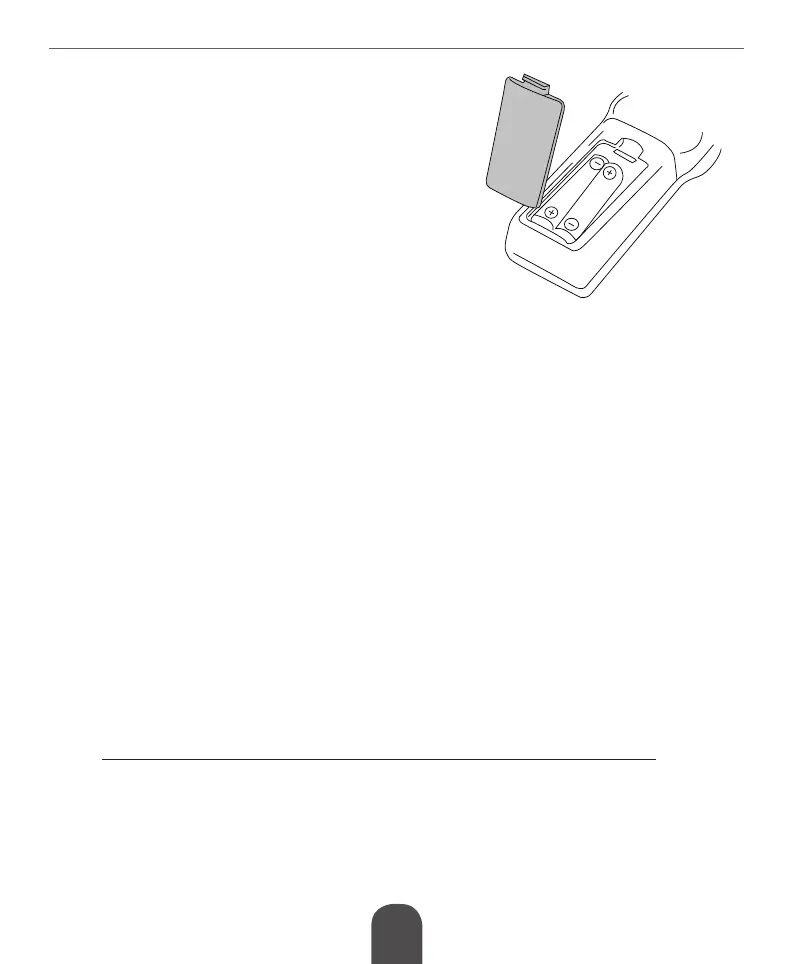
INSTALLATIONOFBATTERIES
1. Openthebatterycompartment.
2. Insert 2x AAA batteries with correct polarization (+/-).
3. Close the battery compartment.
Notes:
• Do not mix the batteries.
• Remove the batteries if the remote control is not
going to be used for an extended period of time.
• Do not place the remote control under the direct
sunlight or near sources of excessive heat.
• Point the remote control to the unit no more than 8
meters from the remote control sensor and within 30°
horizontally and 30° vertically of the front of the unit.
OPERATION
1. Press the MENU button to enter main menu screen.
2. Use navigation buttons on the remote control to navigate the menu and adjust the settings.
3. Press the MENU button to return to the previous menu or press the EXIT button to quit
the menu screen.
MAIN MENU
PROGRAM
Program Edit: Input the password (000000 or 888888) to enter the editing menu. This menu
enables you to edit channel lists by locking, deleting, skipping, moving channels and creating
favorite channels list.
» Move: Select a channel and press the red button on the remote control, the channel will
be marked with an icon. Use the up and down buttons on the remote control to select
newpositionforthischannelandpresstheOKbutton;thechannelwillbemovedtothe
selected position.
Note! When LCN is on, channel will be moved together with its logical number.
» Skip:Selectachannelandpressthegreenbuttonontheremotecontrol;thechannelwill
be marked with an icon. The selected program will be skipped when you switch channels.
To cancel press the green button again.
» Lock:Selectachannelandpresstheyellowbuttonontheremotecontrol;inputpassword
andconrmwiththeOKbutton.Thechannelwillbemarkedwithanicon.Theselected
channel will be locked for choosing. Access to locked channel is available after entering a
password (000000 or 888888). To cancel press the yellow button again.


 To Next Page