Cadillac Escalade Owner Manual (GMNA-Localizing-U.S./Canada/Mexico-
13690472) - 2021 - CRC - 5/15/20
INSTRUMENTS AND CONTROLS 113
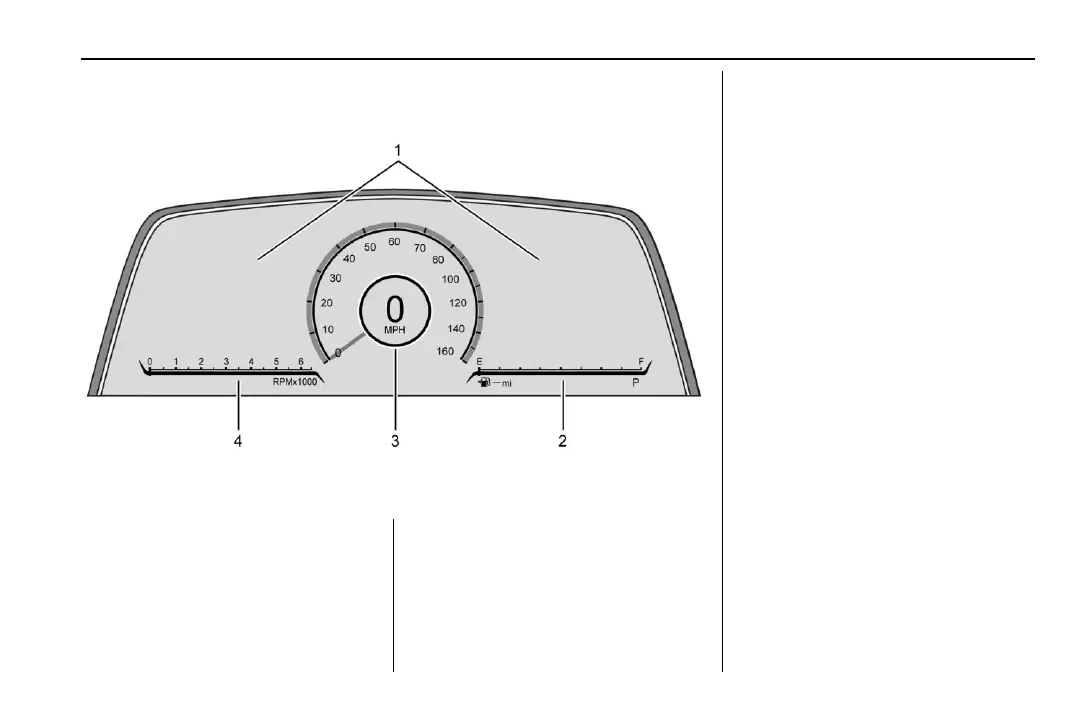
Instrument Cluster
English Gauge Cluster Shown, Navigation, Augmented Reality, Night Vision, and
Metric Similar
1. Driver Information Center (DIC)
0 127
2. Fuel Gauge 0 114
3. Speedometer 0 114
4. Tachometer 0 114
Reconfigurable Instrument
Cluster
The cluster display layout can be
changed.
There are three selectable views:
Gauge : Displays information zones to
the left and right of the speedometer.
Map : Displays a navigation map.
AR Camera : Displays a camera view
in front of the vehicle.
Night Vision : Displays the Night
Vision camera onto the instrument
cluster. See Night Vision System 0 310.
To change the cluster configuration,
touch <instrument cluster icon> on
the touchscreen to the left of the
instrument cluster. Select the desired
option from the list.
The cluster layout can also be selected
using the infotainment display. See
Settings 0 199.












 To Next Page