Installing the Deodorizing/Dust
Collecting/Anti-Bacterial Filter
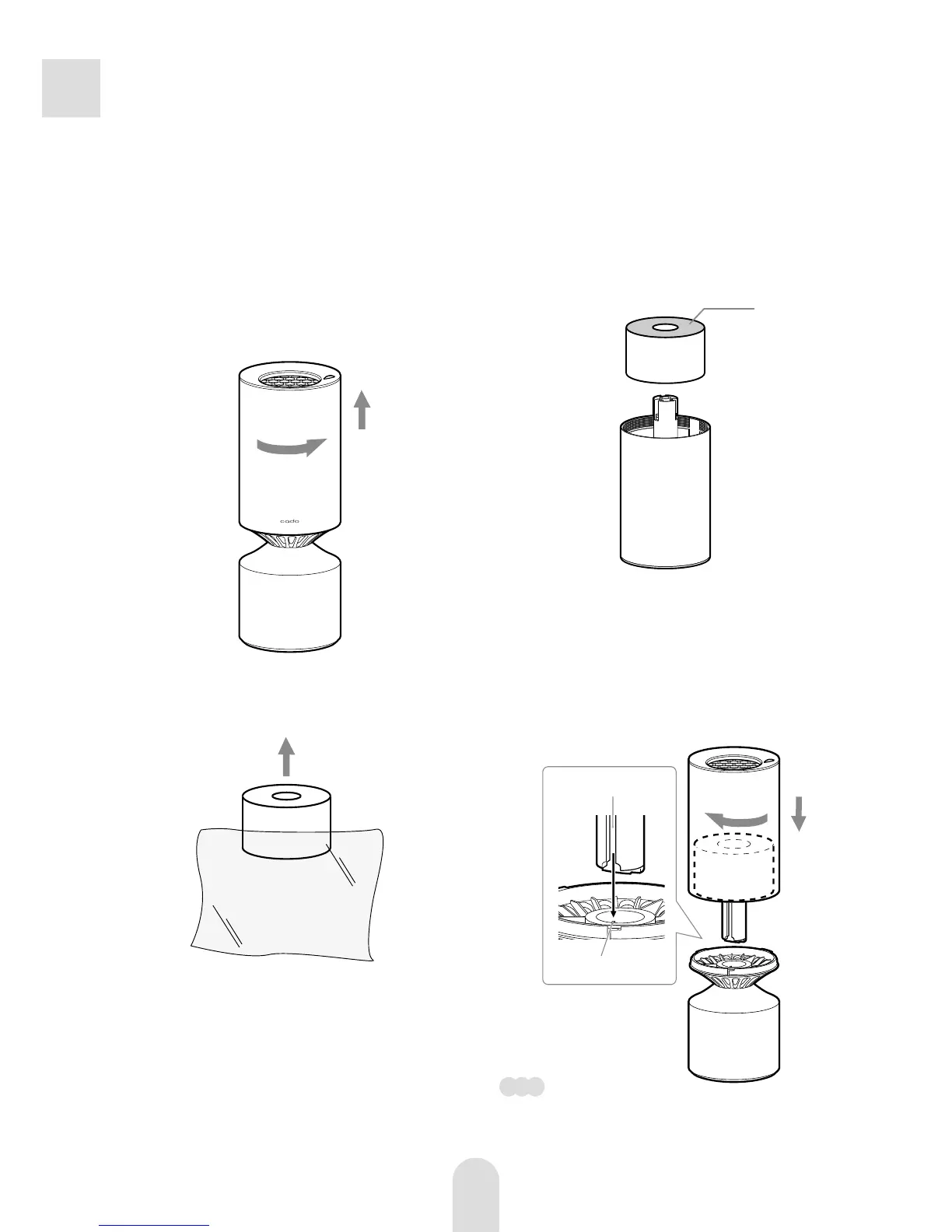
Remove the enclosure.
Rotate the enclosure counterclockwise
in the direction of arrow
a
and lift
upwards
b
.
b
a
1
Be sure to disconnect the power supply
prior to the following operations.
Take out the filter from the
polythene bag.
2
Attach the enclosure.
Supporting the filter with your fingers
a
, align the flute on the side of the
supporting stick with the projection
part in the hole of the chassis
b
. Then
place the enclosure down vertically
c
,
and rotate to the arrow
d
.
d
a
c
b
4
Attach the filter.
Turn over the enclosure, and attach
the filter (blue side faced up) to the
center protrusion.
3
Note
If you cannot attach the enclosure properly,
the filter may be set incorrectly. Check if
the filter is set properly.
Blue side
Flute
Projection part



 To Next Page