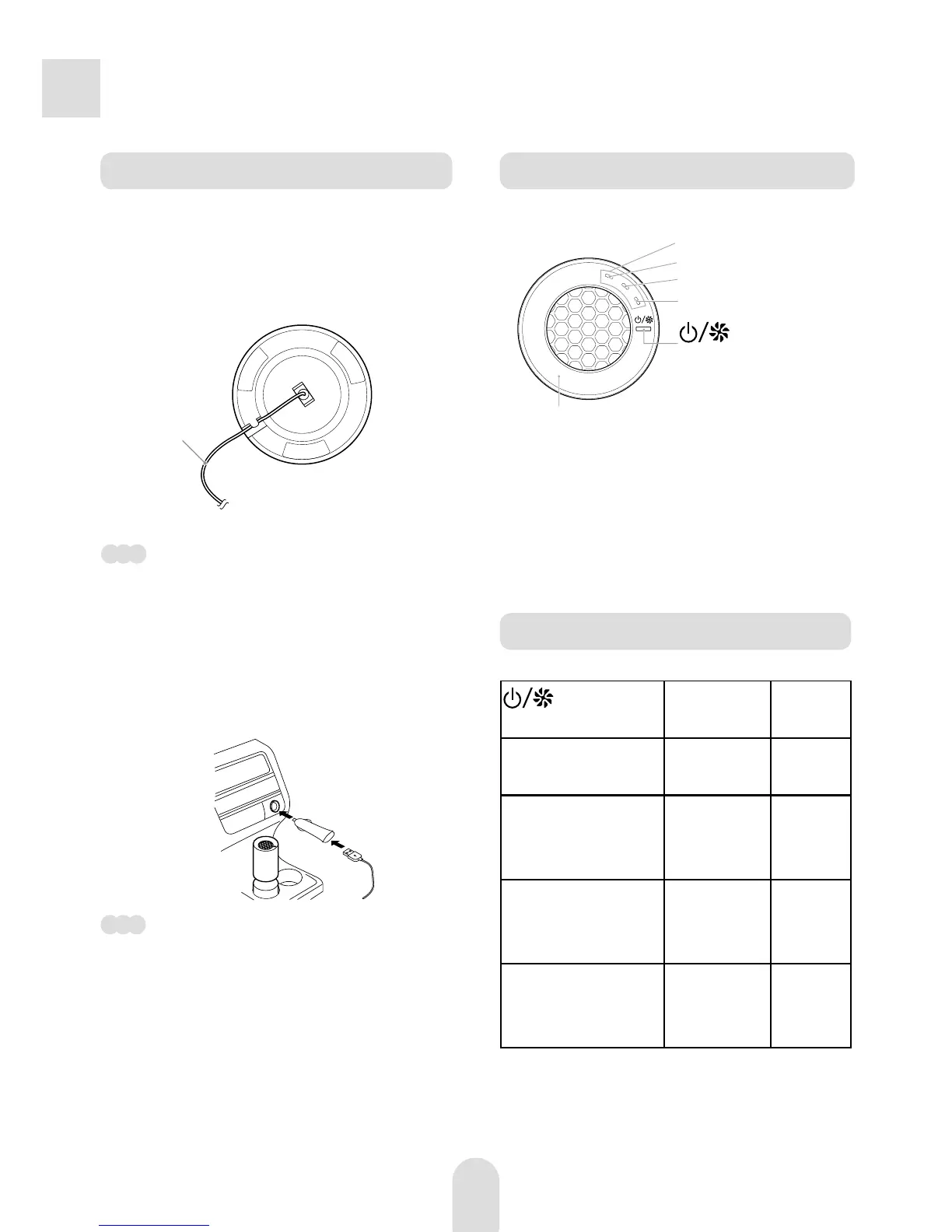
Control Panel
Starting the Unit
(Power/Air
volume) button
Indicator
status
Operation
mode
Press once. Indicator 1
lights up.
Low air
volume
Press twice. Indicators 1
and 2 light
up.
Middle
air
volume
Press 3 times. Indicators
1, 2, and 3
light up.
High air
volume
Press 4 times. Indicators
1, 2, and 3
turn off.
Stops
operating
How to Operate
Preparing before Use
Insert the USB connector (small)
into the connector on the bottom of
the unit.
Note
Make sure to use the supplied USB cord.
Connect the USB connector (big)
of the USB cord into the in-vehicle
charger, and insert the in-vehicle
charger into the charger outlet.
Note
· Range of use of the in-vehicle charger:
DC12-24V (can be used for general
cars, buses, trucks, etc.)
· In order to avoid unnecessary power
consumption, unplug the in-vehicle
charger from the charger outlet when
not using the unit.
1
2
USB cord
(Power/Air
volume) button
Illumination intensity sensor
The illumination intensity sensor senses
ambient brightness. In low ambient
light, the unit automatically reduces the
brightness of all lights. In high ambient
light, the unit automatically increases the
brightness of all lights.
1
2
3
Air volume indicator



 To Next Page