Maintenance
The Unit
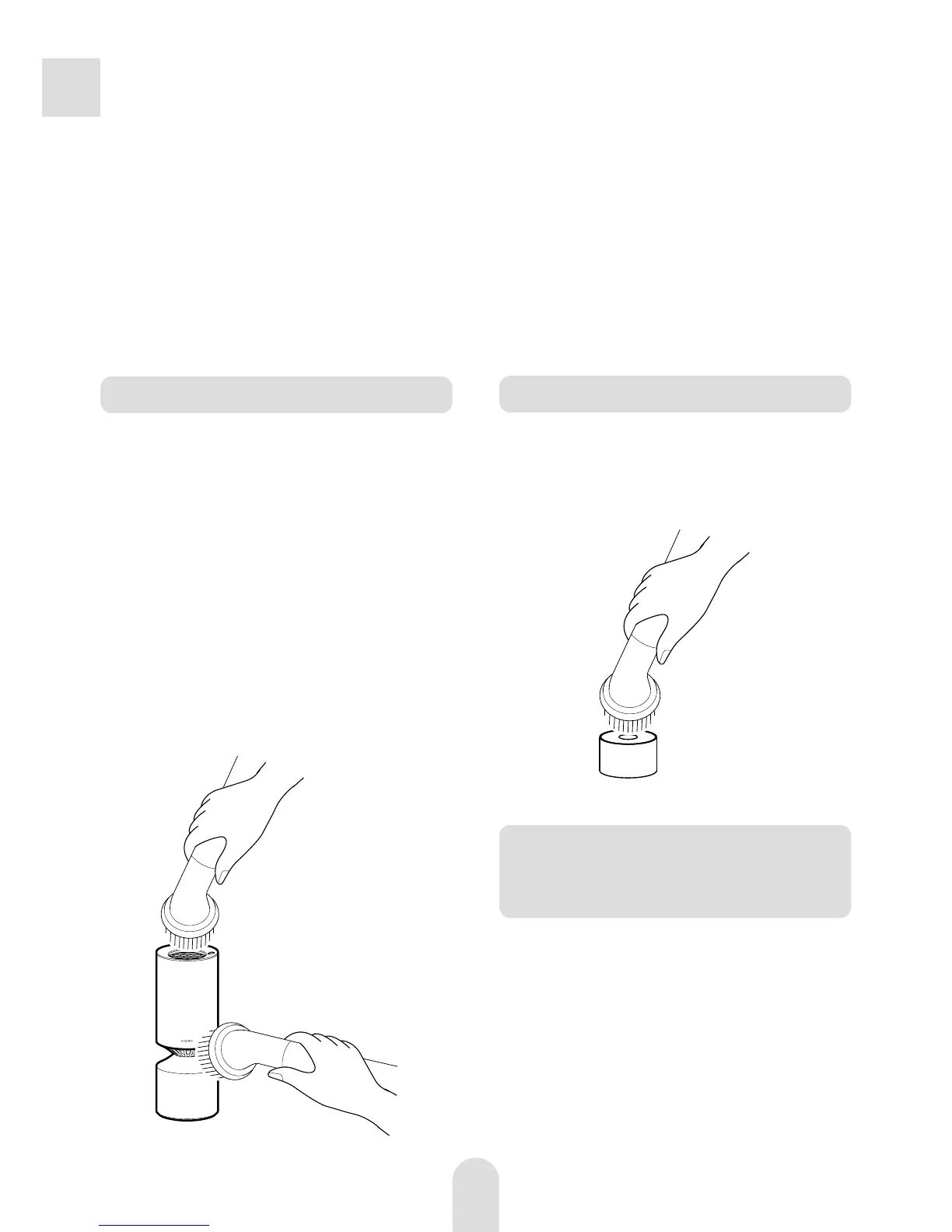
Clean the unit and the air inlet/air outlet
periodically.
Notes on maintenance
·
Be sure to unplug the USB cord from the unit before carrying out any maintenance.
·
Use a soft cloth, cotton buds, etc., to carry out maintenance. If you use a hard brush,
etc., for maintenance, it may cause damage or breakage.
·
Only use neutral detergents if necessary. If you use non-neutral detergents, it may
damage the surface or cause breakage.
Remove dust from the unit with a
soft cloth.
Remove dust from the air inlet/air
outlet with a vacuum cleaner or a
soft cloth.
If the unit becomes very dirty, wipe it with
a cloth dampened with diluted neutral
detergent.
1
2
Replacing the Deodorizing/
Dust Collecting/Anti-
Bacterial Filter
The filter should not be cleaned with water.
Replace it with a new one periodically
(typically every six months depending on
usage).
Filter
Hold the filter with its blue side facing up.
Remove dust from the filter with a vacuum
cleaner or a soft cloth.



 To Next Page