Need help?
Do you have a question about the CADO Leaf Portable MP-C30 and is the answer not in the manual?
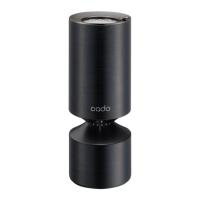
Identifies the main body of the air purifier and its key features.
Details the rear components and the filter housing of the unit.
Illustrates and describes the USB cable and the provided car DC adapter.
Explains the product's functions and its limitations regarding air purification.
Instructions on how to safely remove the top cover to access the filter.
Steps for taking the air filter out of its protective plastic bag.
Guide for correctly installing the air filter into the main unit.
Instructions for properly closing the unit after filter replacement.
Guidance on how to reattach the top cover if it becomes loose or detached.
Step-by-step guide to connect the USB-C end to the device's connector.
Instructions on how to properly route and secure the USB cable for safe operation.
How to connect the other end of the cable to a car DC adapter or USB power adapter.
Identifies and explains the device's control panel buttons and indicators.
How to turn the air purifier on, off, and cycle through operating modes.
How to switch the built-in lamp on and off independently of air purification.
Method for changing the brightness level of the device's lamp.
How the device retains settings after power interruptions or disconnections.
Advice on positioning the unit in areas with good airflow.
Warnings against placing the unit on inclines or in unstable environments.
Caution against placing on soft materials that may block airflow.
Essential steps before cleaning, including power disconnection.
Explains why regular cleaning is crucial for maintaining performance and warranty.
Lists necessary items like soft cloth, cotton swabs, and vacuum cleaner.
Guidance on using diluted neutral detergent safely and avoiding unit damage.
Detailed steps for cleaning the base unit, air inlet, and air outlet.
Instructions for cleaning the filter, emphasizing it cannot be washed with water.
Comprehensive guide to removing the old filter and installing a new one.
Information on filter longevity and factors affecting its replacement schedule.
How noticeable odors may signal a need to replace or dry the filter.
Solutions for when the device fails to power on or function.
Steps to diagnose and fix issues related to reduced or absent airflow.
What to check if all airflow indicators are lit during operation.
Troubleshooting steps for when the unit produces an unpleasant smell or odor.
Comprehensive technical data including model, power, dimensions, weight, and accessories.
Introduction to safety information and the importance of reading the manual.
Details on symbols indicating risks of injury, death, or property damage.
Details on symbols indicating forbidden actions and mandatory instructions.
Lists actions that are prohibited due to significant safety risks like injury or death.
Warnings about placing the unit in cars and handling power adapters/cables.
Precautions regarding voltage, cable damage, and operating near heat sources.
Hazards associated with water contact, cleaning agents, and flammable substances.
Cautions against operating in specific environments or with certain substances.
Instructions for using the correct USB cable and ensuring safe vehicle operation.
Guidance on supervision for vulnerable users and keeping pets away from the unit.
Cautions about placing the unit in unstable locations or near electronic devices.
Warnings against using the product without a filter or during pesticide use.
Cautions regarding vehicle power sockets and cleaning USB plugs.
Instructions on the importance of ventilation and proper filter installation for performance.
The Cado LEAF Portable Air Purifier (model MP-C30) is a compact and portable air purification device designed for personal use. It is not intended to eliminate all harmful substances in the air, such as carbon monoxide, nor does it ventilate a room. Regular room ventilation is recommended when using the product in a closed space.
The Cado LEAF Portable Air Purifier operates by drawing in air through its air inlet, passing it through a filter, and then expelling purified air through the air outlet. It features three operational modes for air volume: Low, Middle, and High, which can be cycled through using the Mode button. The device also includes a lamp with adjustable brightness, controlled by a dedicated lamp control button. The lamp can be used independently of the air purifier function.
The product is designed for domestic use only and is not suitable for use in countries with different voltages, frequencies, laws, and regulations.
Installation and Power Supply: The device uses a USB Type-C plug for power. Users must connect the included USB Type-C cable to the base unit and the other end to the provided car DC adapter or a commercially available USB power adapter with an output current of 1A or higher. The USB cable should be secured through the cable-securing protrusions on the base unit. It's crucial to use the included USB cable and car DC adapter, as they are specifically made for this product. The device does not contain batteries and cannot be charged.
Filter Installation: To install the filter, the top cover must be opened by turning it in the direction indicated by arrow ① and then lifting it in the direction of arrow ②. The filter, which comes in a plastic bag, must be removed from its packaging. The side of the filter with the protrusion should face downward when inserted into the base unit, held by its latches. After installation, the top cover is closed by reversing the opening steps: slowly lowering it in the direction of arrow ① and turning it in the direction of arrow ②. If the top cover doesn't close completely, the filter may not be set correctly. In case the top cover comes off, it should be realigned using the △ symbols on the cover and base unit and pushed down firmly.
Operation: The device is started by pressing the Mode button, which cycles through the air volume settings: Low, Middle, High, and then OFF. The current air volume is indicated by illuminated dots.
Lamp Control: The lamp can be turned ON or OFF by lightly pressing the lamp control button. Holding the lamp control button for a second or longer adjusts the brightness through High, Middle, and Low settings. The last brightness setting is retained even if the lamp is turned OFF. If the air purifier function is stopped, the lamp will also turn OFF.
Memory Function: The device retains its last operational state (mode, lamp ON/OFF, and lamp brightness) if USB power is disconnected during operation. When USB power is reconnected, operation resumes from the saved state, and the lamp will turn ON.
Notes on Installation: The air purifier should be placed in an area with good air circulation, away from inclines, unstable locations, or areas where objects could fall on it. It should not be placed on soft materials like carpeting, electric carpets, or futons, as this could obstruct the air inlet and outlet and cause malfunctions.
Cleaning Procedure: Before cleaning, the USB cable must be removed, and all operations stopped. Regular cleaning (at least once a month) is recommended to prevent dust accumulation and maintain performance. Failure to clean may void the manufacturer's warranty in case of malfunctions due to contamination.
Replacing the Filter: The filter is a consumable item and must be replaced periodically. The replacement timing varies depending on the usage environment, but a rough standard is once every six months to a year. In heavily polluted air, replacement may be needed sooner. If odors become noticeable after several weeks to months, the filter may need replacement or can sometimes be improved by drying it in the sun (though this doesn't guarantee performance recovery). When replacing the filter, ensure the USB cable is removed from the base unit. The replacement process involves removing the old filter and inserting a new one, following the same steps as initial filter installation.
Troubleshooting: The manual provides a troubleshooting guide for common issues:
 General
| Brand | CADO |
|---|---|
| Model | Leaf Portable MP-C30 |
| Category | Air Cleaner |
| Language | English |

 To Next Page