Need help?
Do you have a question about the Cafe BELLISSIMO and is the answer not in the manual?
Always follow these safety precautions when using the appliance to prevent hazards.
Prepare drip tray, water tank, and coffee bean hopper before first use.
Plug in the machine, press the power button, and select a function.
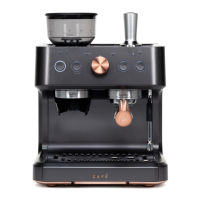
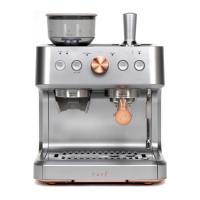
Identifies main components like Water Tank, Bean Hopper, Portafilter, Steam Wand, and Drip Tray.
Details contents of the cleaning kit: brush, pin, solution, and water hardness strip.
Illustrates single and double layer filters for different shot sizes.
Shows the included milk pitcher for frothing.
Overview of the control panel buttons, knob, and indicators.
Importance of the neutral position for starting brew functions.
Explains the Power, Grind, Single, and Double buttons for operation.
How to adjust default dispense volumes for espresso shots.
Using the steam wand for milk frothing and dispensing hot water.
Indicators for bean hopper status, locked rotor, and continuous runtime.
Notifies when the water tank is low or missing.
Signals when a descaling cycle is required for maintenance.
Steps for grinding, tamping, and brewing espresso shots.
Correctly installing the portafilter and handling grounds.
Detailed steps for frothing milk and achieving desired texture.
How to dispense hot water from the steam wand.
Waking the machine, managing sounds, and performing a factory reset.
Addressing overpressure and portafilter installation problems.
Guide to adjusting grind, volume, and brew time for optimal taste.
Understanding brew ratios and adjusting for shot flavor.
Instructions for washing the water tank, drip tray, and wiping the exterior.
Detailed two-stage process for descaling the espresso machine.
Steps for cleaning the grinder burrs and the steam wand tip.
Cleaning portafilter/filters and emptying system for storage.
Using a test kit and setting water hardness via the app.
Advice on bean choice and warming cups before brewing.
Tips on milk types for foam and making Cappuccinos/Lattes.
Detailed guidance on steaming milk for microfoam and texture.
Checks for power connection, GFI plug, and basic operation.
Solutions for coffee not being hot enough or long heat-up times.
Addresses issues with water/steam or coffee not dispensing.
Fixes for no crema, weak espresso, or watery coffee.
Resolving issues where the 'Add Water' alert doesn't appear correctly.
Troubleshooting loud grinder noise or interrupted dispensing.
Fixes for portafilter not locking and water under the drip tray.
Steps to enable and connect the espresso maker to your WiFi network.
Overview of remote monitoring, control, and notifications via smartphone.
Statement regarding device compliance with FCC and IC rules.
Information on safe separation distance for radio frequency exposure.
Information on what the one-year limited warranty covers and excludes.
Details on consumer rights and warrantor contact information.
Accessing support services, products, and information via the website.
Instructions for registering your appliance for enhanced service.
Information on how to order replacement parts and accessories.
Ways to contact Cafe Appliances customer support for assistance.
 General
| Brand | Cafe |
|---|---|
| Model | BELLISSIMO |
| Category | Coffee Maker |
| Language | English |

 To Next Page