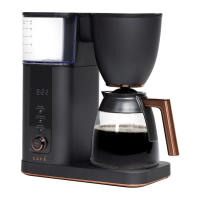
This document is an owner's manual for a Café Drip Coffee Maker, models C7CDAASXXXXX and C7CDABSXXXXX. The manual provides detailed information on the coffee maker's function, technical specifications, usage, and maintenance.
Function Description
The Café Drip Coffee Maker is designed to brew coffee. It features various settings to customize the brewing process, including strength, temperature, and auto-brew functions. The coffee maker is also Wi-Fi enabled, allowing for remote monitoring and control through a smart device. It can brew coffee using either a mesh basket filter or a No. 4 paper filter. The device is intended for indoor use only.
Important Technical Specifications
The coffee maker operates on a 120 V, 60 Hz standard electrical supply. It is designed to brew coffee at temperatures between 185°F and 205°F for optimal flavor extraction. For altitudes over 5000 feet, it is recommended to use 185°F to prevent water from boiling. The temperature setting can be adjusted, with a display showing "200" as the default or current temperature. The strength setting offers "Gold," "Light," "Medium," and "Bold" options, corresponding to different cup increments and temperature ranges for optimal flavor. "Gold" strength is recommended for 1 to 10 cups, with a temperature selection between 185°F and 205°F. The coffee maker includes a carbon filter for water filtration.
Usage Features
Setup:
- Clock: To set the clock, push and hold the Temperature button for 3 seconds. Rotate the Brew/Select knob to set AM/PM, hour, and minutes. Push the Brew/Select knob to confirm each selection. The "Clock" illuminates on the display.
- Strength: Push the Strength button to select the desired coffee strength (Gold, Light, Medium, Bold). The Strength options illuminate on the display. "Gold" is the optimal brewing setting for 1 to 10 cups, with a temperature range of 185-205°F.
- Temperature: Push the Temperature button to adjust the brewing temperature. The temperature button illuminates, and the display shows the current temperature (e.g., "200"). To switch from Fahrenheit to Celsius, press and hold the Strength and Temperature buttons simultaneously for 3 seconds. For high altitudes, adjust the temperature down to 185°F to prevent boiling.
Brewing:
- Manual Brew: Ensure the brew basket insert and drip stop lever are in place. Use either the mesh basket filter or a No. 4 paper filter. Fill the carafe with the desired amount of water (up to the MAX level indicator) and pour it into the water reservoir. Add the appropriate amount of ground coffee (one level scoop per 4.5 oz serving of coffee). Push the Brew/Select knob to confirm the number of cups and start brewing.
- Auto Brew: To set an auto-brew time, push the Auto Brew button for 3 seconds. Rotate the Brew/Select knob to set AM/PM, hour, and minutes. Push the Brew/Select knob to confirm each selection. The "Auto On" illuminates on the display. The coffee maker will automatically start brewing at the preset time. Gold strength is selected by default for auto-brew.
- Warming Plate: For glass carafe models, the warming plate will stay on for 2 hours after the brew cycle ends. "Hot" will illuminate on the screen to indicate the warming plate is still hot. Do not touch the warming plate or glass carafe during the brew cycle or up to 2 hours after.
Wi-Fi Setup:
- Pairing: To put the device into Pairing Mode, press and hold the Auto Brew and Temperature buttons at the same time for 3 seconds. The Wi-Fi symbol will illuminate under the Time Display.
- Connect: The coffee maker is Café Wi-Fi Connect Enabled. Download the Smart HQ app to monitor, control, and receive notifications. Visit cafeappliances.com/connect for more information.
Maintenance Features
Care and Cleaning:
- Outside of the Coffee Maker: Clean with a soft, damp cloth. Do not use paper towels or abrasive cloths.
- Brew Basket and Mesh Basket Filter: Remove the mesh basket filter and brew basket. Discard any ground coffee. After each brew, rinse the mesh basket filter and brew basket under running water. For a deeper clean, wash in warm soapy water with a soft bristled brush. These parts are NOT dishwasher safe.
- Carafe: After each use, empty the carafe. Rinse the carafe and lid under warm running water. Letting coffee stand overnight in the carafe can lead to staining. For a deeper clean, wash regularly in warm, soapy water and a soft bristled brush. Do not use abrasive cleaners. The carafe and lid are NOT dishwasher safe.
- Descaling: Hard water can cause mineral build-up. The coffee maker needs to be descaled regularly. When descaling is needed, the "Descale" indicator will flash on the display. To descale, use a mixture of half water/half vinegar. Fill the reservoir to the MAX indicator. Run the coffee maker through a brewing cycle using the 10 cup setting. Once the mixture is gone, run the 10 cup brew setting 3 times using clear water in the reservoir.
- Filter Removal: To remove the filter cage from the water reservoir, use a spoon to wedge under the side tab and lift up the cage. To replace, simply push into the hole until the cage sets into place. It is recommended to change the filter at least every 3 months.
- Showerhead: To clean the showerhead, turn the knob to the right and pull it out. Make sure the Unlock icon is lined up with the arrow. Wash in warm, soapy water with a soft bristled brush. Rinse and dry thoroughly.
Troubleshooting:
The manual includes a troubleshooting section with common problems and their solutions, such as error messages like "add H2O," "Err," "Err1," "Err2," "Err3," "Err4," "Err7," and issues with the carafe not being in place. For additional assistance, users are directed to visit cafeappliances.com.

 Need help?
 General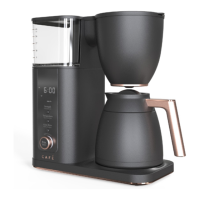

 To Next Page