7
SetUp
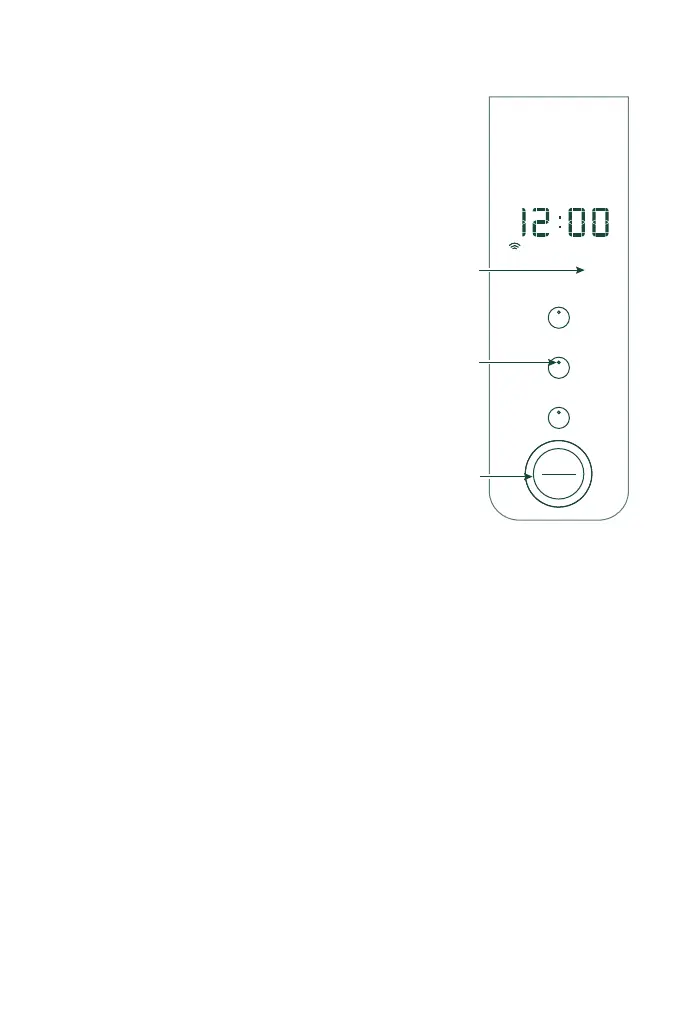
CLOCK
■ Push the Temperature button and
hold for 3 seconds. Clock illuminates
on the display and the white dot
on the Temperature button will
illuminate.
■ To set AM/PM: Rotate the Brew/
Select knob and push to select.
To set Hour: Rotate the Brew/Select
knob and push to select.
To set Minutes: Rotate the Brew/Select
knob and push to select.
After you confirm to quit, the outer
ring will illuminate. The ring will not
illuminate to confirm each selection.
NOTE: Push and hold the Brew/Select
knob for 3 seconds at any time to exit
the sub-menu and revert to the previous
settings.
Auto Brew
Hold to Program
Temperature
Hold to Set Clock
Strength
Hold to Descale
AM
Select
Brew
H
o
l
d
t
o
C
a
n
c
e
l
PM
Clock
Button Dot
Illuminates
“Clock”
Illuminates
Push to Select


 To Next Page