16
SetUp
WiFi
Enjoy a whole new level of convenience with WiFi connected features, alerts, and
programmability through the SmartHQ
TM
mobile app. To get started, download the
SmartHQ
TM
app from the Apple app store, or Google Play.
Temp
Strength
Delay
Brew
Hold to Cancel
Power
Hold to Cancel
Hour
Minute
6-24 Oz
Mug
4-10 Cups
Carafe
Brew
Hold to Clean
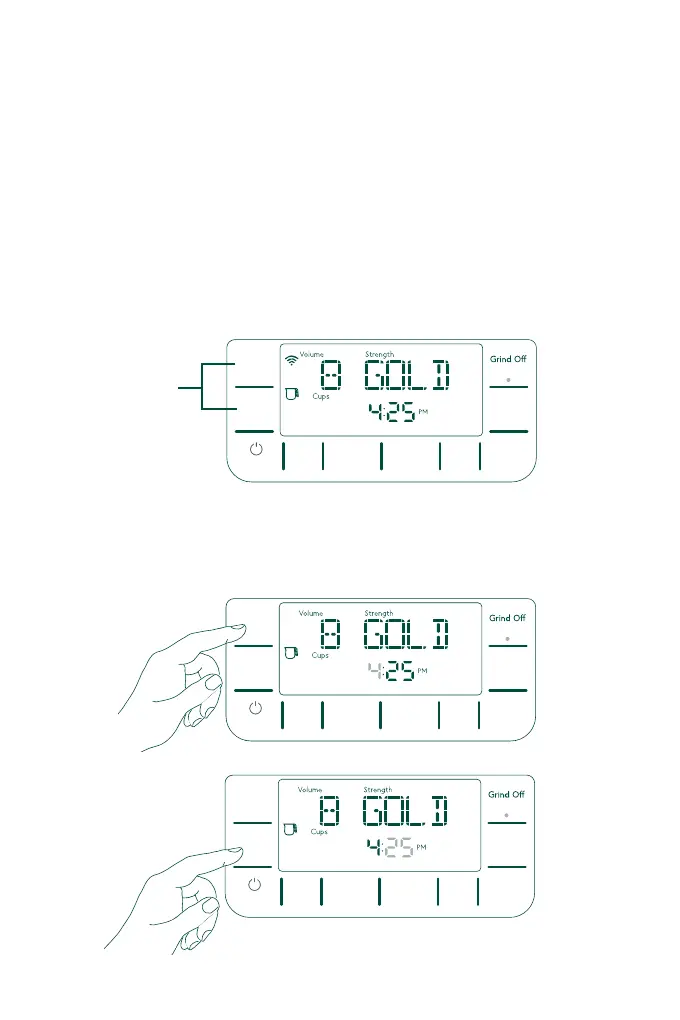
Press and Hold
the Hour and
Minute button
to turn on/o
WiFi.
Follow the instructions on the app to pair with the machine. Once the app is installed,
the app will sense the machine nearby via bluetooth.
To turn on WiFi, press and hold the Hour and Minute buttons together for 3 seconds.
To turn off the WiFi, press and hold the Hour and Minute buttons together for
3 seconds again. Once this is confirmed, the display will blink “WIFI OFF” for 3
seconds and WiFi icon will turn off.
Set Clock
To set clock, press Hour or Minute buttons, the number begins blinking to indicate
starting changes. Continue to press the button to start changing the number. The
number increments will increase faster if the button is held down.
Temp
Strength
Delay
Brew
Hold to Cancel
Power
Hold to Cancel
Hour
Minute
6-24 Oz
Mug
4-10 Cups
Carafe
Brew
Hold to Clean
Temp
Strength
Delay
Brew
Hold to Cancel
Power
Hold to Cancel
Hour
Minute
6-24 Oz
Mug
4-10 Cups
Carafe
Brew
Hold to Clean


 To Next Page