10.
DISPENSING BEVERAGES - Using Factory Settings
MAINTENANCE TIP: Traces of the previous product dispensed may remain in the
circuit of the machine. To maintain the maximum beverage flavour, please cycle
(rinse) water through the machine after every use.
Ensure you insert the Rinse Capsule into the Capsule Compartment before
commencing the rinse cycle. This will assist in reducing the amount of water entering
into the Used Capsule Drawer. Regularly check the Used Capsule Drawer and empty
any water that may be collected in the drawer to stop water overflowing.
NOTE: The quantity of beverage dispensed can be programmed according to
personal taste and the size of the cups or mugs used. Please refer to chapter
'Programming the Quantity of Beverage in a Cup' on Page 11.
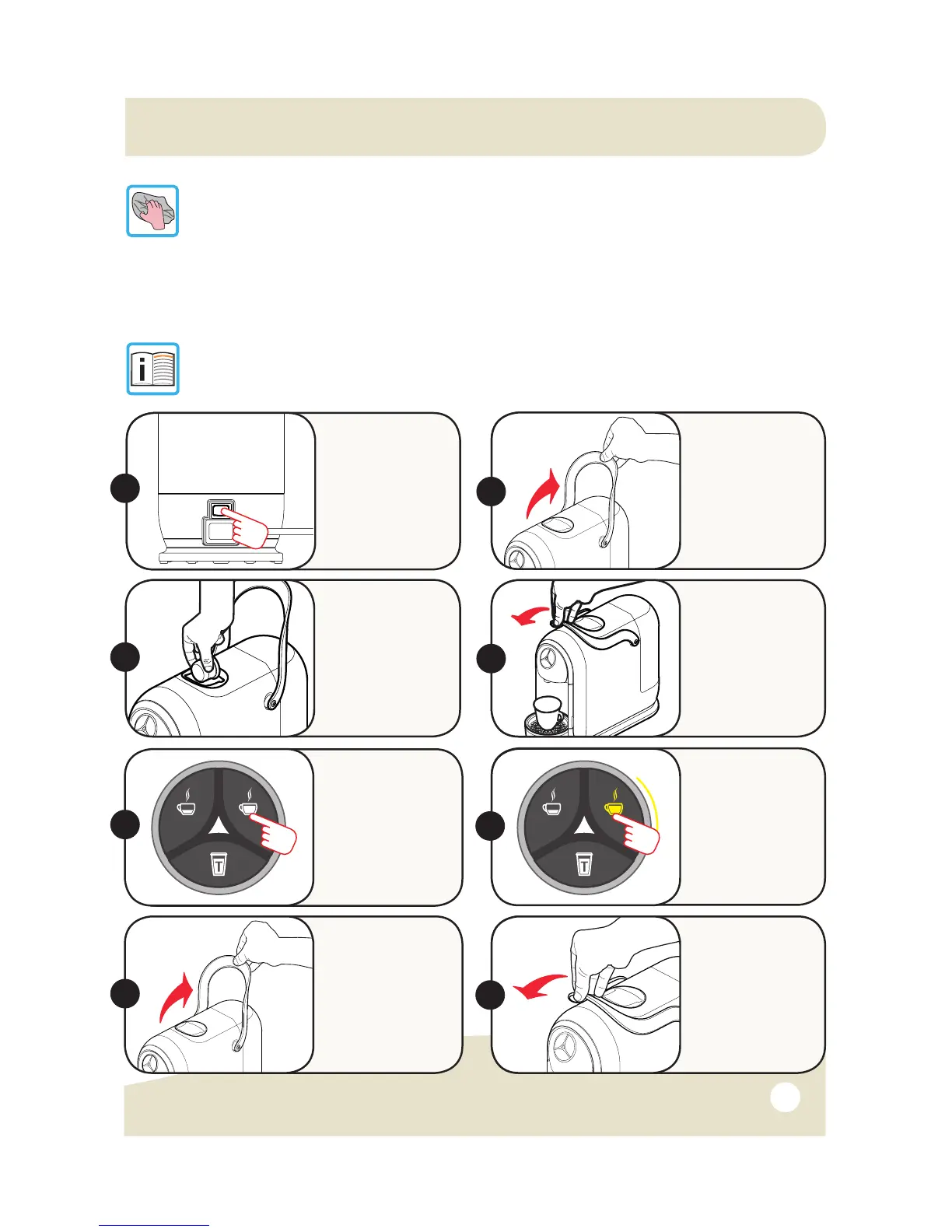
Raise the Lever
to eject the used
capsule into the
Used Capsule
Drawer.
Close the Lever.
Insert the
capsule, pressing
it gently into
place.
3.
Close the Lever
fully and place
a cup or mug
under the Coffee
Dispensing
Spout.
4.
Raise the Lever
to open the
Capsule
Compartment.
Switch the
machine ON
using the On/
Off Switch.
Wait about 1
min. for machine
to warm up.
Press and release
the button
corresponding
to the type of
beverage you want
as per Diagram 3
on Page 6.
5.
6.
ON
The selected
beverage button will
blink and machine
will stop dispensing
on reaching the
programmed
quantity.
2.
7.
8.
1.
S21 Capsule Machine Instruction Manual 3/09/15


 To Next Page