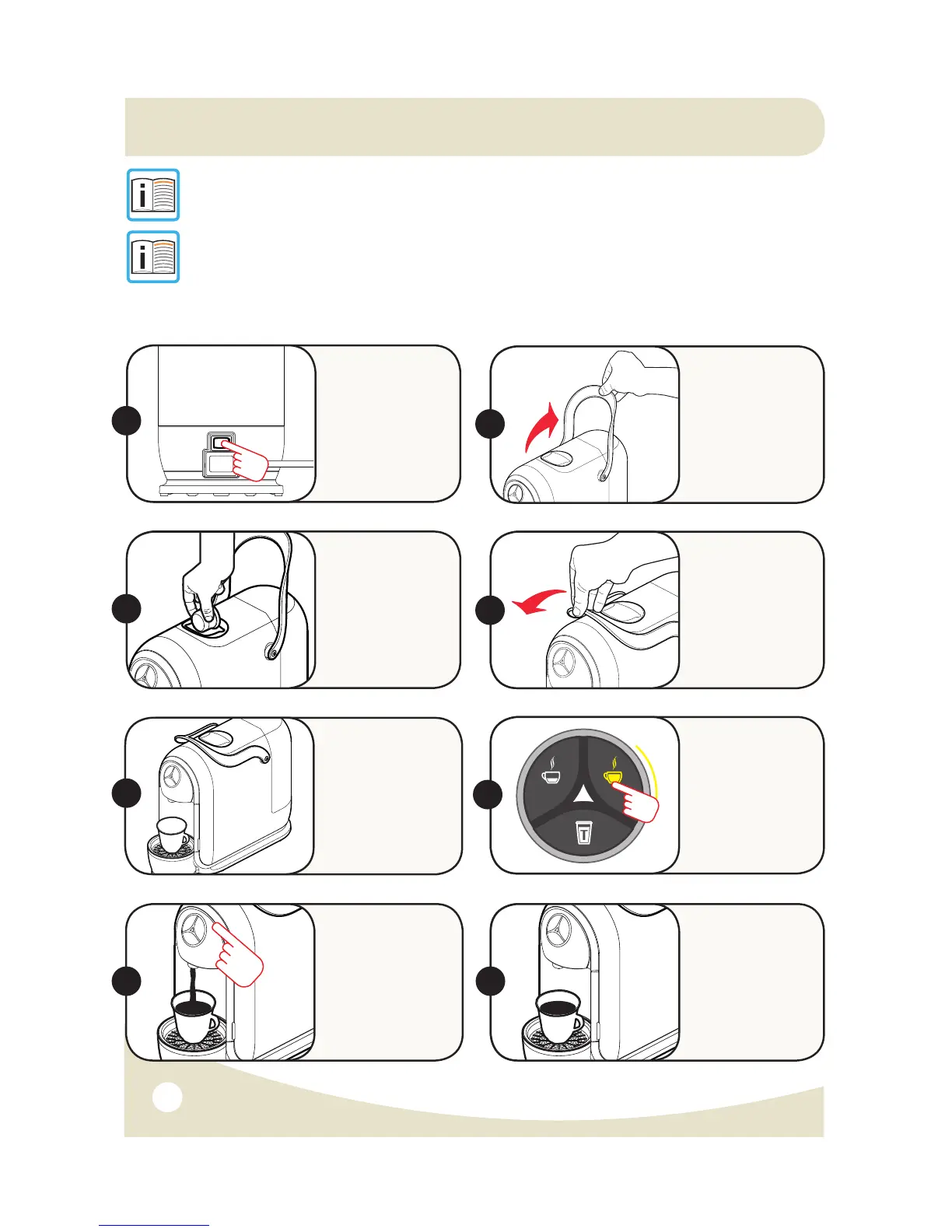
PROGRAMMING THE QUANTITY OF BEVERAGE IN A CUP
11.
NOTE: The quantity of coffee dispensed may be programmed,
from a minimum of 30ml to a maximum of 250ml.
NOTE: Recommended Programming/Factory Programming:
- 30ml: Single Espresso Shot
- 60ml: Double Espresso Shot
- 120ml: Tea (& Hot Water Button)
Note: Quantities are approximate and may vary slightly between capsules.
Switch the
machine ON
using the On/
Off Switch.
Wait about 1
min. for machine
to warm up.
Raise the
Lever to open
the Capsule
Compartment.
ON
1.
2.
Insert the
capsule, pressing
it gently into
place.
Close the
Lever fully.
3.
4.
Place a cup
or mug under
the Coffee
Dispensing
Spout.
5.
Press and HOLD
the desired
beverage button.
6.
On reaching the
desired amount
of beverage,
release the
button.
Now the button is
programmed
to your desired
amount.
7. 8.
S21 Capsule Machine Instruction Manual 3/09/15


 To Next Page