EasyManua.ls Logo

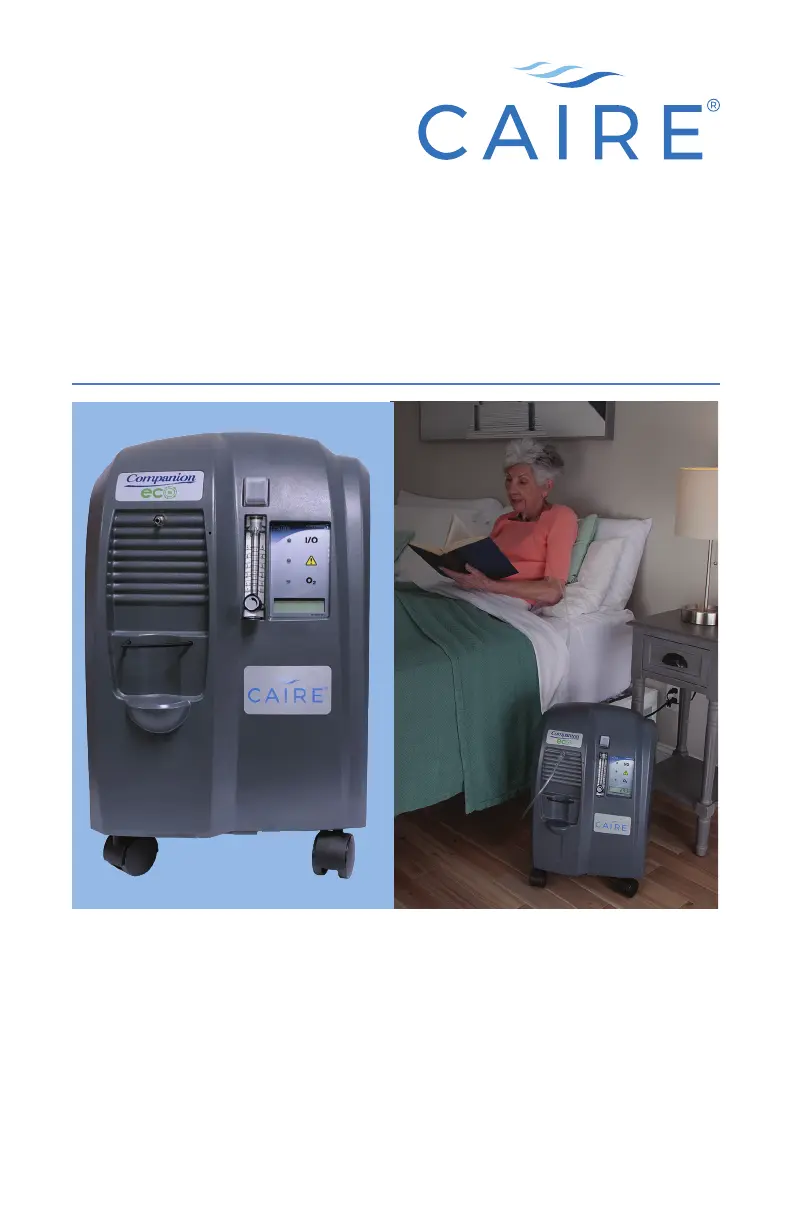
CAIRE Companion 5 - User Manual

CAIRE Companion 5
356 pages
Print Icon
To Next Page IconTo Next Page
Loading...
Companion 5
TM
User Manual (English)
Manuel d’utilisation (Français)
Bedienungsanleitung (Deutsch)
Manual del usuario (Español)
Manuale dell’utente (Italiano)
Manual do utilizador (Português)
Gebruikershandleiding (Nederlands)
Brugervejledning (Dansk)
Bruksanvisning (Norsk)
Bruksanvisning (Svenska)
Käyttöopas (Suomi)

(Türkçe)
 
 (Polski)
(Magyar)

Other manuals for CAIRE Companion 5

Questions and Answers

  • M
    Mary KnoxJul 27, 2025
    What to do if I have low or no oxygen flow from my CAIRE Oxygen Equipment?
    • T
      Tracy OrtizJul 28, 2025
      If you're experiencing low or no oxygen flow with your CAIRE Oxygen Equipment, first, make sure the flow control knob is set to the Liter Per Minute (LPM) prescribed by your doctor. Check all tubing connections to ensure they are secure. Inspect the oxygen tubing and cannula for kinks, blockages, or leaks, and repair or replace them as needed. Also, ensure that the concentrator's air inlets are not blocked and are at least 12 inches (30 cm) away from obstructions. If the issue persists, use a back-up oxygen supply and contact your healthcare provider immediately, as it could indicate an internal failure.
  • A
    Alexis RodgersAug 7, 2025
    Why is my CAIRE Oxygen Equipment on but not running?
    • O
      oparksAug 7, 2025
      If your CAIRE Oxygen Equipment is turned on but not running, start by ensuring the electrical cord is properly plugged into an outlet. Next, check if the outlet is providing power by testing a different device or checking your household fuse and circuit. If the issue continues, connect to a back-up oxygen supply and contact your healthcare provider immediately, as this may indicate an internal failure.
  • B
    Bradley WeaverAug 15, 2025
    What to do if my CAIRE Oxygen Equipment flowmeter ball does not drop completely to the bottom?
    • S
      suzannecervantesAug 15, 2025
      If the flowmeter ball doesn't drop completely, it indicates a leak between the top of the flowmeter and the unit's outlet. Place your thumb over the unit's outlet to check for leaks.

Summary

User Controls & System Status Indicators

Internal Symbols and Indicators

Describes various symbols and their meanings for device operation.

Quick Start Guide

Unpacking and Initial Placement

Instructions for initial device setup and positioning.

Familiarizing with Device Features

Overview of key components and controls.

Companion 5 Components and Connections

Component Descriptions

Details the purpose and location of key external parts like case, switches, and displays.

Attaching Humidifier and Cannula

Steps for attaching and using the humidifier bottle and connecting the cannula.

Powering On and Adjusting Flow

Power On and Warm-Up Procedure

Steps for powering on the device and understanding startup indicators.

Setting Oxygen Flow Rate

Guides on using the flow control knob to set the prescribed oxygen level.

Flow Rate Setting Safety Warning

Important safety notice regarding prescribed oxygen levels.

Safety, Indications, and Contraindications

General Safety Information and Cautions

Covers essential safety information and precautions for users.

Intended Use and Contraindications

Details the device's purpose and situations where it should not be used.

Key Safety Guidelines

Outlines crucial safety rules and manufacturer recommendations for safe operation.

Operational Safety Precautions

Environmental, Usage, and Handling Warnings

Warnings related to placement, ventilation, handling, and accessories.

Flammability and Fire Hazard Risks

Highlights risks associated with oxygen and flammable materials.

Fire Safety and Operational Warnings

Smoking, Flammables, and Maintenance

Warnings on smoking, flammable materials, maintenance, and accessories.

Cord Safety, Chemical Exposure, and Incident Reporting

Addresses cord hazards, chemical exposure, and incident reporting procedures.

Device Specifications and Placement

Technical Specifications Overview

Lists key technical parameters and operating conditions of the device.

Optimal Device Placement Guidelines

Provides recommendations for positioning the unit for effective operation.

Operating Instructions: Initial Setup

Pre-Operation Checks and Cleaning

Covers initial reading, safety, device function, and cleaning notes.

Connecting Humidifier or Cannula

Steps for connecting the humidifier bottle or tubing directly.

Operating Instructions: Power and Connection

Connecting Humidifier Tubing

Details connecting the humidifier tube to the bottle and unit.

Powering On and Warm-Up Procedure

Steps for connecting power, turning on the unit, and understanding startup indicators.

Power Cord Safety Inspection

Crucial warning about checking the power cord for damage before use.

Operating Instructions: Usage and Shutdown

Adjusting Oxygen Flow Rate

Guides users on setting the correct flow rate using the knob.

Verifying Flow and Breathing Normally

Instructions for confirming oxygen flow and proper breathing technique.

Turning Off the Device

Steps for safely shutting down the concentrator.

Operational Cautions and Vent Blockage

Additional cautions regarding accessories, cords, and vent blockage.

Recommended Accessories

Oxygen Administration Accessories

Lists essential accessories like cannulas, tubing, and humidifier bottles.

Firebreak Accessory Functionality

Explains the purpose and use of the firebreak accessory.

Alarm Conditions Overview

Interpreting LED and Audible Alarms

Explains how the device uses lights and sounds for malfunctions.

Alarm Warning and Backup Recommendation

Important warning to not ignore alarms and to have backup oxygen.

Alarm Conditions Table

Troubleshooting Alarms: Causes and Actions

Details specific alarm causes, LED indicators, and required user actions.

Troubleshooting Common Issues

Device Not Running Troubleshooting

Steps for diagnosing and resolving issues when the unit won't start.

Low or No Oxygen Flow Troubleshooting

Guides users through common causes of reduced or absent oxygen flow.

Cleaning, Care, and Maintenance

Routine Maintenance and Filter Cleaning

Covers filter changes, cleaning, and cannula replacement.

Humidifier Bottle and External Cleaning

Instructions for cleaning the humidifier bottle and the unit's exterior.

Cleaning Precautions and Disposal

Safe Cleaning Procedures and Restrictions

Emphasizes safe cleaning methods and lists restricted cleaning agents.

Device Disposal and Environmental Compliance

Instructions on proper disposal and mentions WEEE/RoHS compliance.

Electromagnetic Compatibility (EMC) Emissions

Electromagnetic Emissions Guidance

Details the device's RF emissions compliance and usage environment.

Electromagnetic Immunity: General Standards

Immunity Test Levels and Environments

Outlines the device's immunity to electrical and magnetic disturbances.

Electromagnetic Immunity: RF and Conducted

RF and Conducted Immunity Testing

Details the device's resistance to RF interference and recommended separation distances.

RF Wireless Communication Immunity Tests

Specific Immunity Test Parameters

Lists test frequencies, services, and immunity levels for RF equipment.

RF Interference Separation Distances

Safe Distances from RF Transmitters

Provides guidance on recommended distances based on transmitter power.

CAIRE Companion 5 Specifications

General IconGeneral
Flow Rate0.5 to 5 LPM
Weight36 lbs (16.3 kg)
Outlet Pressure5.5 PSI
Operating Temperature41°F to 104°F (5°C to 40°C)
Storage Temperature-4°F to 140°F (-20°C to 60°C)
Oxygen Concentration90% (+5.5% / -3%)
Sound Level≤ 45 dBA
Power Consumption275W Average
Dimensions13.5 in W x 12 in D x 21.5 in H (34.4 cm W x 30.5 cm D x 54.6 cm H)
AlarmsHigh Temperature
Operating HumidityUp to 95% non-condensing

Related product manuals